
- Amazon Athena
- Amazon EMR
- Amazon Quicksight
- AWS Glue
- What is Data Lake?
- AWS MSK: Managed Streaming for Apache Kafka
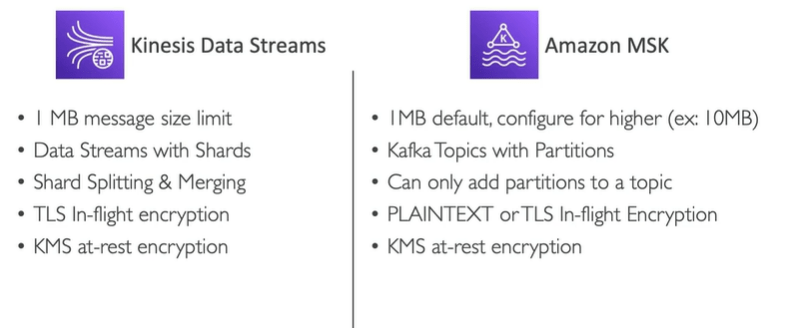
- AWS Kinesis Data Streams vs AWS MSK
- AWS Big Data Ingestion Pipeline
- DMS ( Database Migration Service )
- What is Fargate?
- What is ECR?
- AWS Batch
- Batch vs Lambda
- Amazon LightSail
- AWS Code Deploy
- AWS Code Commit
- AWS Code Build
- AWS Code Pipeline
- AWS Code Artifact
- AWS Code Star
- AWS Cloud9
- AWS System Manager (SSM )
- AWS System Managers Capabilities ( AWS SSM)
- AWS System Managers Parameter Store (AWS SSM Parameter Store)
- How to Create AWS SSM Parameter store
- How to retrieve the SSM Parameters using AWS SSM get-parameters
- AWS S3 Transfer Acceleration
- AWS Outposts
- AWS Wavelength
- AWS Local zones
- Global Applications Architecture
- AWS Cloud Integrations
- Amazon MQ (Good for Hybrid solution)
- AWS Event Bridge
- Amazon X Ray
- Amazon Code Guru
- AWS service Health Dashboard
- AWS Personal Health Dashboard
- AWS VPC Endpoints or AWS PrivateLink
- AWS Private Link (VPC Endpoint Services )
- AWS VPC Flow Log
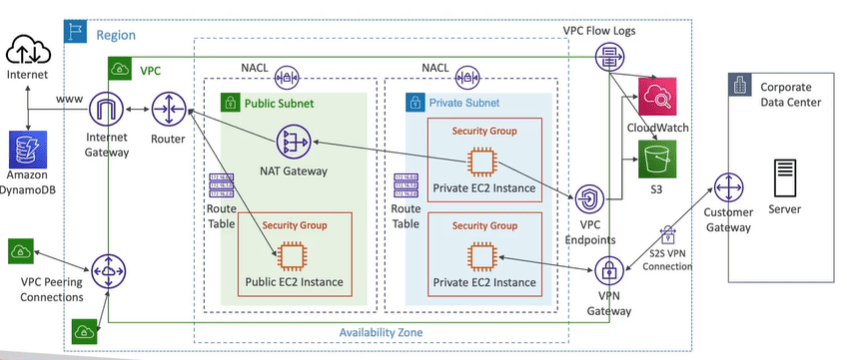
- AWS VPC Logs architecture
- Site to Site VPN
- Direct Connect (DX)
- Transit Gateway
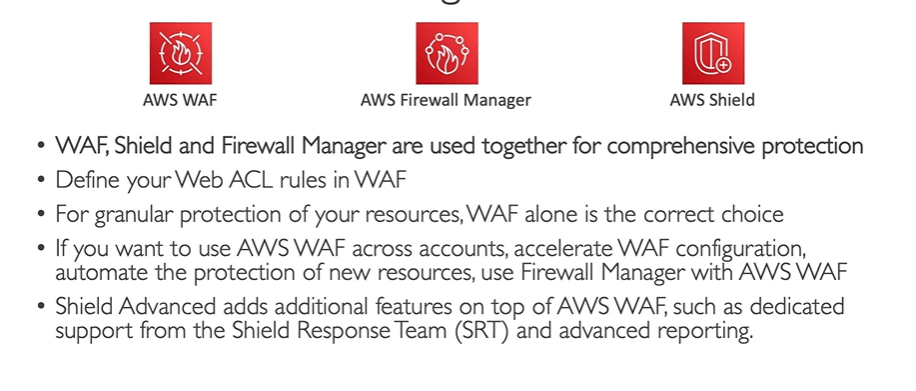
- DDOS Protection (Distributed denial of services)
- Data at Rest vs Data in Transit encryption
- Encryption in Flight ( TLS / SSL)
- Server side encryption at rest
- Client Side Encryption
- AWS KMS (Key management service).
- CloudHSM
- Customer Master Keys ( Paid)
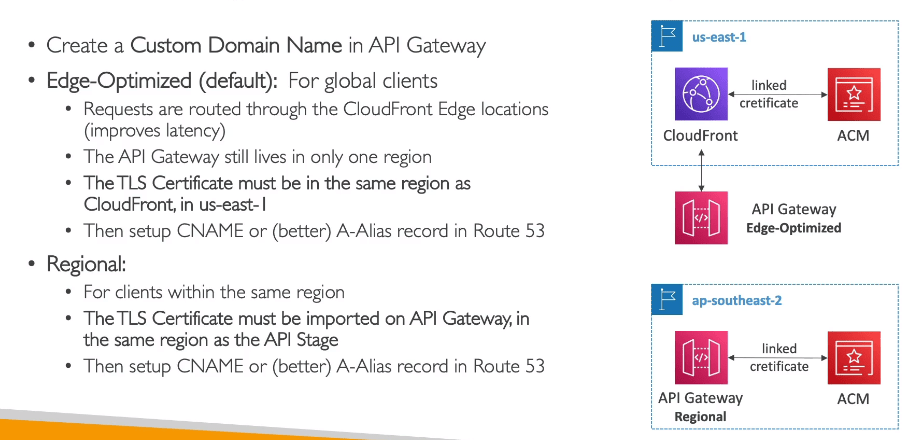
- AWS Certificate Manager (ACM) or AWS ACM
- Integrating API Gateway with AWS ACM
- Requesting Public Certificates
- Artifact
- AWS Guard Duty
- Amazon Inspector
- AWS Security HUB
- AWS Detective
- AWS Abuse
- AWS Rekognition or Amazon Rekognition
- AWS Transcribe
- AWS Polly
- AWS Translate
- AWS Lex and AWS connect
- AWS Comprehend
- AWS Sagemaker
- AWS Forecast
- AWS kendra
- AWS Personalize
- AWS Textract
- AWS Organizations
- Advantages of AWS Organizations
- How to Create AWS Organizations
- What is AWS Control Tower ?
- What is AWS Cognito ?
- AWS DIRECTORY SERVICES (HYBRID)
- IAM Identity Center to Setup Active Directory
- AWS IAM Identity Center ( AWS Single Sign on )
- What is AWS Amplify?
- Well
- AWS Elasticbeanstalk
Amazon Athena
Server less query service to perform analytics against AWS S3. Athena uses standard SQL language to query files. AWS Athena supports CSV, JSON and Avro and Parquet. These are used with Amazon Quicksight for reporting and dashboards.
The common use case of Amazon Athena are business intelligence , analytics, reporting and query VPC flow logs, ELB logs, Cloud trail etc.
You can use columnar data for cost savings, compress data for smaller retrievals, partition datasets in S3 for easy querying on virtual columns.
Athena allows you to run SQL queries across data stored in relational, non relational object and custom data sources either hosted in AWS or on premises.
Athena uses data source connectors which are hosted on AWS Lambda which further queries federated queries like monitoring CloudWatch or DynamoDB the database logs.
Amazon EMR
EMR stands for Elastic MapReduce that helps in creating hadoop clusters that is big data clusters to analyze and process data.
These clusters are made of hundreds of EC2 instances and comes bundled with Apache Spark, Hbase. It also takes care of all provisioning and configuration.
EMR cluster is built with different node configuration such as:
- Master Node: Mange and coordinate the cluster and health for long running.
- Core Node: Run tasks and store data for long running.
- Task Node: To run the tasks just the tasks.
Amazon Quicksight
Amazon Quicksight is serverless machine learning that allows to create interactive dashboards. It is also integrated with AWS RDS, Aurora, Athena, Redshift, AWS S3.
It is also highly integrated with SAAS data sources such as JIRA, on premises database (JDBC). You may import data into excel, csv, json, .tfv formats.
They have their own users for authentication unlike IAM.
AWS Glue
AWS Glue is managed extract, transform and load ( ETL) service that is useful to prepare and transform data for analysis. It is fully server less service
What is Data Lake?
Data Lake can collect and store any data at any scale and at a low cost. It also secures the data and unauthorized access. It decouples storage and compute.
- Data Lake is a semi structured, structured and unstructured data, which is generally used for data science projects, for predictive analysis and BI.
- It is great for storing granular data, raw data and processed data.
- In case of Data Lake you create the schema only when reading the data i.e. schema on read.
- Separation of compute and storage, meaning the storage and compute are different services in Data Lake. For example Redshift spectrum or Athena does the compute and S3 does the storage.
- The reason we need data lake because we are getting lots of data, diversified consumers, multiple access mechanism and Query results getting faster using low-cost storage.
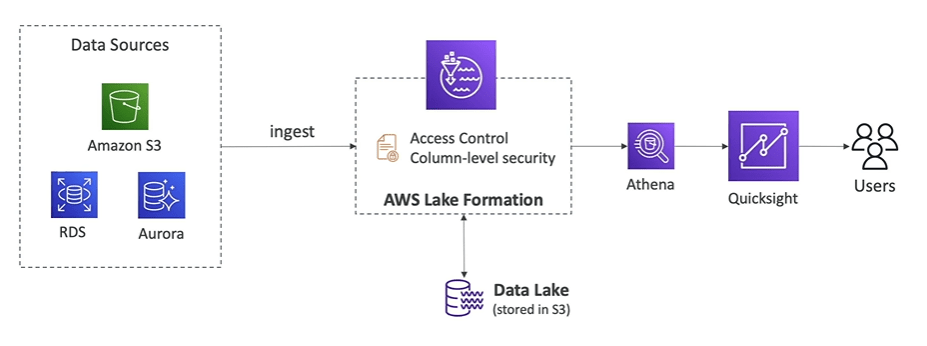
Data Lake formation allows you to create data lake in AWS account.
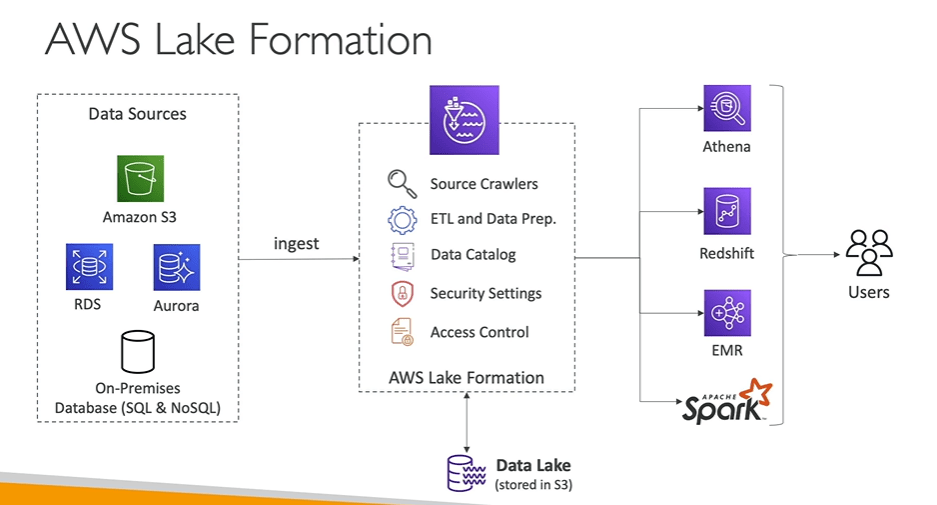
- Combine structure and unstructured data in data lake.
- It automates many complex manual steps and de duplicate.
- With Lake formation you can manage centrally all the securities such as who can analyse or which service will require authentication and permissions.
AWS MSK: Managed Streaming for Apache Kafka
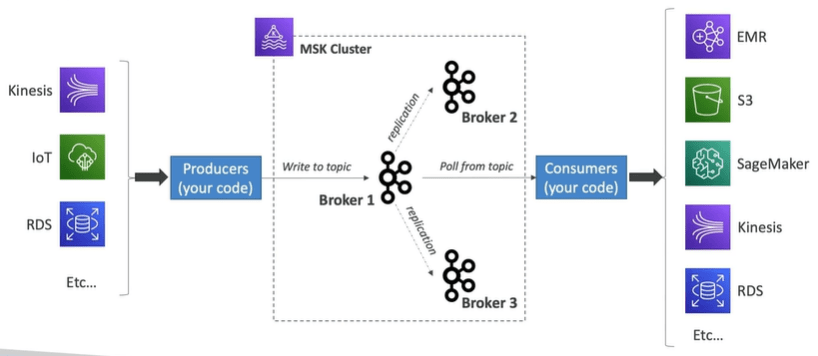
AWS MSK allows you to stream the data which is an alternate to Amazon Kinesis. It is fully managed Apache Kafka on AWS. It allows you to delete, create and update clusters.
MSK Cluster allows you to create and manage Kafka brokers nodes and zookeeper nodes for you.
You can deploy MSK cluster in high availability which are up to three zones.
AWS Kinesis Data Streams vs AWS MSK
AWS Big Data Ingestion Pipeline
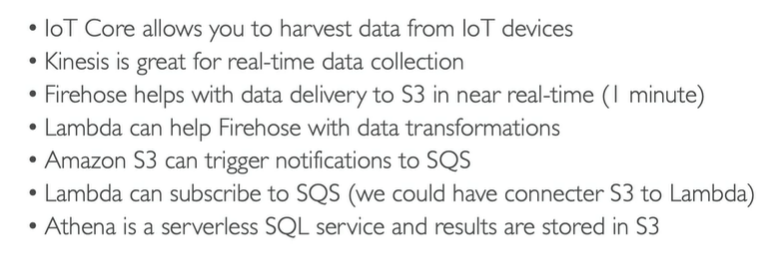
In this section we would like to create a pipeline which is fully serverless, collect data in real time transform the data, query the transformed data using SQL, reports created using the queries needs to be stored in AWS S3 and finally load the data into warehouse and create dashboards.

DMS ( Database Migration Service )
Quickly and securely migrate databases to AWS.
What is Fargate?
Launch Docker on AWS without even managing AWS EC2 instances are this is serverless service. AWS just runs containers for you based on CPU/RAM you need.
What is ECR?
ECR stands for Elastic container registry. It is a private registry where you store docker images. We store Docker images so that they can be run by ECS or Fargate.
AWS Batch
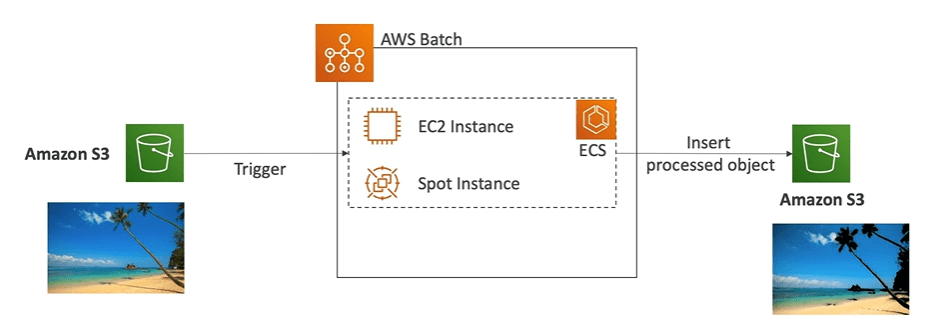
- Fully managed batch processing at any scale is taken care by AWS Batch.
- Batch Job will dynamically launch EC2 instances or spot instances.
- You can submit or schedule batch jobs and rest of the things are taken care by AWS Batch.
- Batch jobs are defined as Docker images and run on ECS.
For example, you uploaded a image in AWS S3 and then S3, will trigger a batch job which will launch a container on EC2 instance using ECS service which will insert the processed object into AWS S3 again.
Batch vs Lambda
Lambda has time limit of 15 mins, limited runtimes. Limited disk space and serverless
Batch has no time limit, any runtime as its packed docker images and rely on EBS or instance store or EC2 for disk space.
Amazon LightSail
- Virtual server, storage, database, and networking with low and predictable pricing.
- Simpler alternative to using EC2, RDS, ELB, Route 53 etc.
- Great for people with little cloud experience.
AWS Code Deploy
We want to deploy our application automatically. It works with EC2 and on premises servers.
AWS Code Commit
AWS Code Commit allows you to store the code in a repository using the Git technology.
It makes it easy to collaborate with others on code.
AWS Code Build
Allows you to build the code in the cloud. First thing, it compiles the code, run tests and produces the packages that are ready to be deployed.
AWS Code Pipeline
To orchestrate the different steps such as Code, build, test, provision and deploy then we need a way which is handled by AWS Code build.
AWS Code Artifact
Software’s depends on each other while building also known as code dependencies. Storing and retrieving these dependencies is called artifact management.
Code artifact is secure scalable and cost-effective artifact management for software management.
It works with Gradle, npm, pip and NuGet.
AWS Code Star
It is unified UI to easily manage the software development activities in one place.
AWS Cloud9
It is cloud IDE (Integrated development environment) Like visual code studio for writing, debugging and running code.
It can be also used as web browser. It also provides code collaboration in real time.
AWS System Manager (SSM )
AWS Systems Manager is the operations hub for your AWS applications and resources and a secure end-to-end management solution for hybrid and multi-cloud environments that enables secure operations at scale.
- AWS System manager manages your EC2 and on premises systems at scale.
- Patching automation for enhanced compliance
- Run commands across fleet of servers
- Store parameter configuration with SSM parameter store.
- Works for both Windows and Linux OS.
- Install SSM agent on all EC2 instance and then SSM sends the command to servers using these agents
AWS System Managers Capabilities ( AWS SSM)
Lets checkout some of the capabilities that AWS System managers have:
- Application management
- Change management
- Node management
- Operations management
- Quick Setup
- Shared resources
- Run commands:
- Execute a document or just run a command.
- Run command across multiple instances.
- No need for SSH
- Send notifications to SNS about command status.
- It can be invoked using Event bridge.

AWS System Manager Session Manager ( AWS SSM Session Manager)
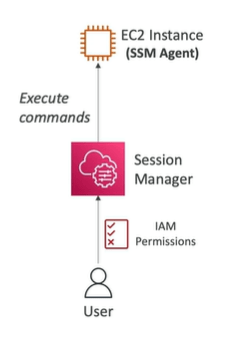
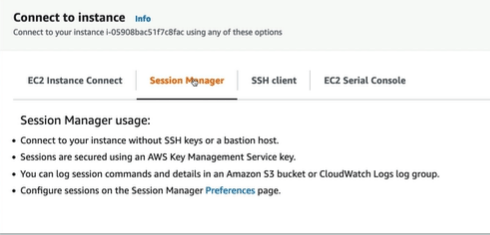
This allows you to start a secure shell on your EC2 and on premises servers without needing SSH, bastion hosts or SSH Key or Ports.
Install SSM agent on all EC2 instance and then SSM sends the command to servers using these agents
- Navigate to AWS Management console and to Systems manager and further to fleet manger and launch an EC2 instance.
- Next, click on Session Manager, here click on Session manager click on Start session.

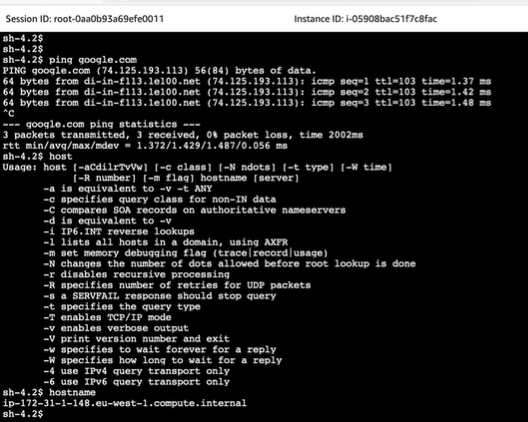
- You can also go to session manager under connect to instance on the instance itself.
AWS System Managers Parameter Store (AWS SSM Parameter Store)
The AWS System Managers Parameter Store is used to centrally store the secrets and configuration data such as passwords, database strings and licence codes.
You can encrypt values, or store as plain text and secure access at each level.
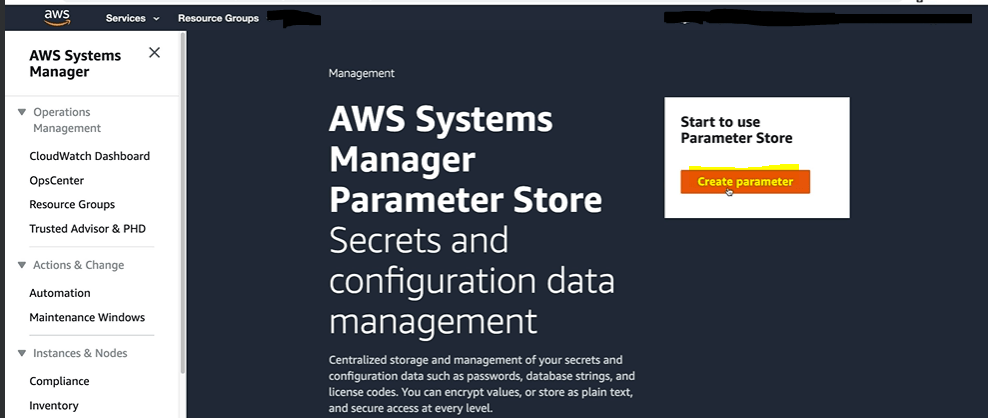
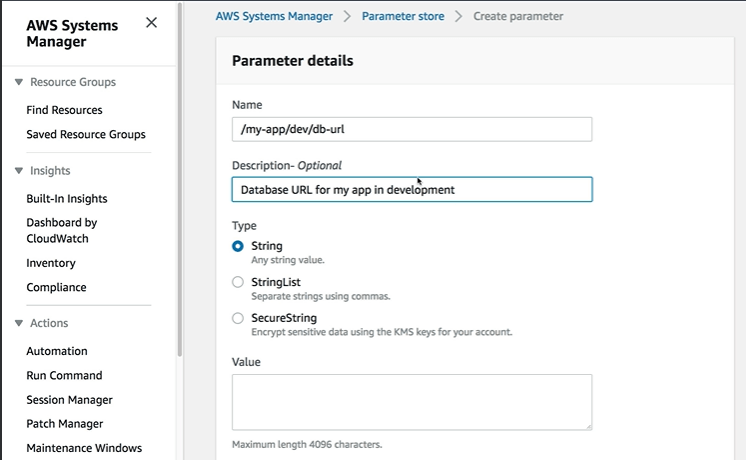
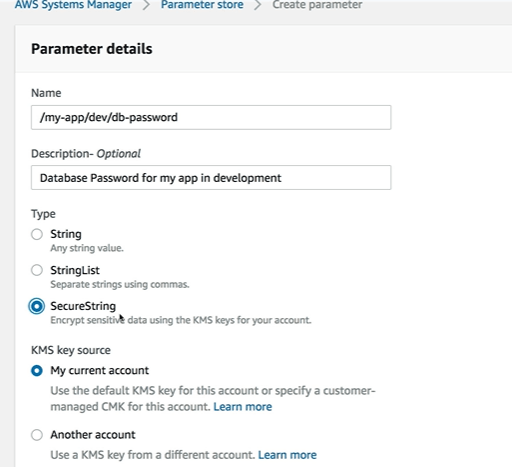
How to Create AWS SSM Parameter store
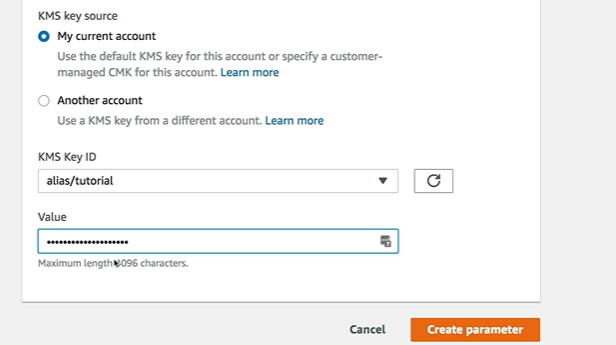
How to Retrieve the SSM Parameters using AWS SSM get-parameters
aws ssm get-parameters --names /myapp/dev/db-url
aws ssm get-parameters --names /myapp/dev/db-password
aws ssm get-parameters --names /myapp/dev/db-url --with-decryption
AWS S3 Transfer Acceleration
If you want to increase the speed of the transfer of files into AWS S3 bucket, that is if you want to upload the file quickly into AWS S3 then you should consider using AWS S3 transfer acceleration.
With AWS S3 transfer acceleration you use Edge location in between to speed the process of uploading the file.
Client —— Edge location ———–AWS S3 bucket
AWS Outposts
AWS Outposts is a fully managed service that extends AWS infrastructure, services, APIs, and tools to customer premises. If you need to work on AWS Infrastructure kind of environment, then use AWS outposts. AWS configures racks and servers on your on-premises environment and then you can start leveraging the AWS services on premises.
Now you are responsible for managing physical security for the outpost’s racks.
Benefits: Easier migration from on premises to the cloud, local data processing and low latency access to on premises systems.
The services that work with Outposts are: EC2, EBS, S3, EKS, ECS, RDS and Amazon EMR.
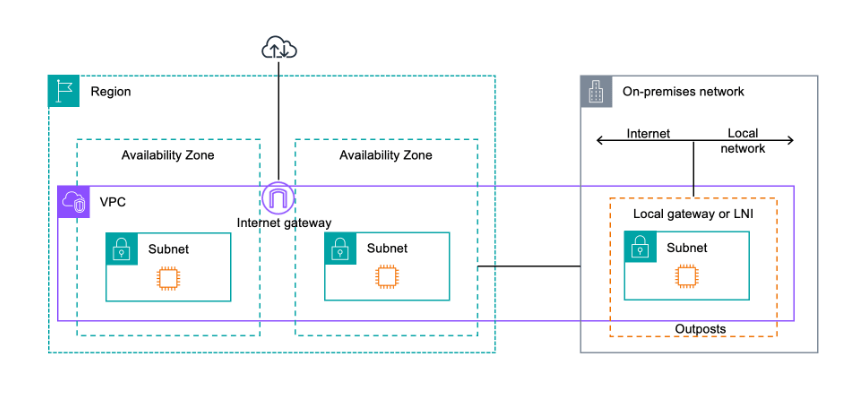
With Outposts, you are responsible for providing resilient power and network connectivity to the Outpost racks to meet your availability requirements for workloads running on Outposts.
With AWS Outposts, you are responsible for the physical security and access controls of the data center environment. You must provide sufficient power, space, and cooling to keep the Outpost operational and network connections to connect the Outpost back to the Region.
Since Outpost capacity is finite and determined by the size and number of racks AWS installs at your site, you must decide how much EC2, EBS, and S3 on Outposts capacity you need to run your initial workloads, accommodate future growth, and to provide extra capacity to mitigate server failures and maintenance events.
AWS is responsible for the availability of the Outposts infrastructure including the power supplies, servers, and networking equipment within the AWS Outposts racks. AWS also manages the virtualization hypervisor, storage systems, and the AWS services that run on Outposts.
You purchase a configuration for a 3-year term and can choose from three payment options: All Upfront, Partial Upfront, and No Upfront.
AWS Wavelength
AWS Wavelength allows developer to build applications that deliver low latencies to mobile devices and end users.
You can deploy compute and storage services to wavelength zone. You can extend a virtual private cloud (VPC) to one or more Wavelength Zones.
Wavelength zones are infrastructure deployments that are embedded in the telecommunication providers datacentre at the edge of 5G network.
Some of the AWS resources on Wavelength are:
- Amazon EC2 Auto Scaling
- Amazon EKS clusters
- Amazon ECS clusters
- Amazon EC2 Systems Manager
- Amazon CloudWatch
- AWS CloudTrail
- AWS CloudFormation
Use case of Wavelength zone are:
- Low latency access to the compute infrastructure that’s needed to run data processing and analytics on AWS Wavelength enables real-time monitoring of data from sensors on the vehicle.
- Wavelength provides the ultra-low latency needed to live stream high-resolution video and high-fidelity audio.
- With Wavelength, you can stream the most demanding games from Wavelength Zones so that they are available on end devices that have limited processing power.
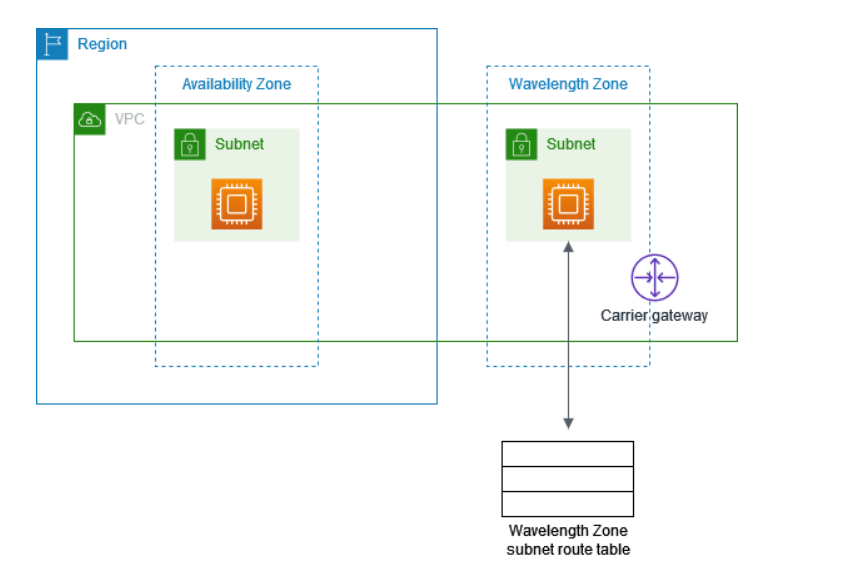
Some of the important facts on the AWS Wavelength zones are:
- Between EC2 instance and internet TCP outbound and the response are allowed.
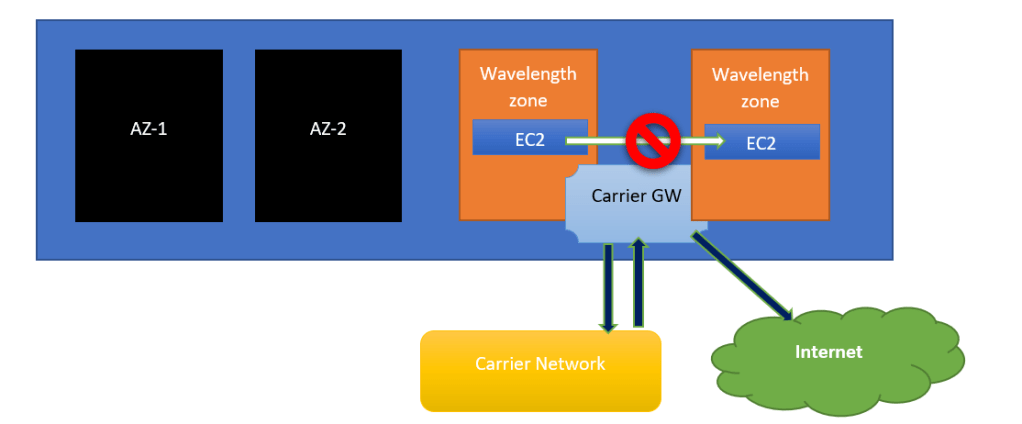
- You cannot use Dedicated Instances or Dedicated Hosts.
- Snapshots of EBS volumes and AMIs are stored in the AWS Region and You can only use
gp2volumes. - To use VPC endpoints, you must create the endpoint in an Availability Zone in the VPC. You cannot create the endpoint in a Wavelength Zone.
- You can use an Application Load Balancer only in a Wavelength Zone in North America.
AWS Local zones
To keep the AWS compute, storage, database and other related AWS services closer to the end user to run the latency sensitive applications.
Under region > click on zones
So, once you select the local zone then you will be able to create the EC2, subnet etc in the local zone to remove the latency of the application.
Global Applications Architecture
The best is to have multi region, active-active so that lets say EC2 in both regions can read and write data into these, which will improve latencies.
AWS Cloud Integrations
There are services that are synchronous (Which are generally straight forward from application to application) and unsynchronous that means they are event based or application to queue and queue to application.
You can use multiple services which an act as synchronous such SQS, SNS and kinesis.
- SQS: It is a queue model
- SNS: It is a notification service
- Kinesis: It is a real time data streaming model.
Amazon MQ (Good for Hybrid solution)
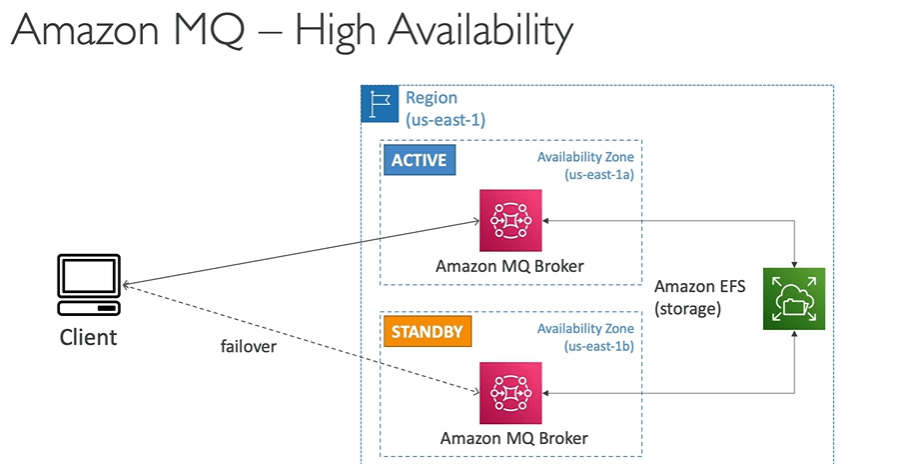
If you using SNS, SQS on AWS cloud and however if you are using third party software’s to publish the data such as Active MQ Rabbit MQ then while migration to cloud it will be difficult so why not use MQ, instead of reengineering the application to use the SQS and SNS.
Amazon MQ, doesn’t scale as much as SQS/SNS, runs on servers and can run on multi cluster and has both SQS and SNS features.
AWS Event Bridge
With Event Bridge you can take actions on generated events such as running a script or scheduling a script. You can also define rules within the Event Bridge such as every hour script will run the lambda function. Or the other example can be created a event when IAM root user sign into the AWS account.
Some of the other examples are: Start EC2 instance, Failed build by code build, new finding by Trusted advisor, upload object in AWS S3.
All the events are sent via event bus even the third-party events generated by AWS SAAS partners such as data dog or Zendesk are sent via partner event bus.
Amazon X Ray
If you use Amazon X ray you get a full picture of your application in details with all logging enabled. It simplifies to understand dependencies in a microservice architecture.
Amazon Code Guru
It is a ML powered service that is used for automated code reviews and application performance recommendations. There is a code reviewer, build & test functions, and code guru profilers to deploy the code and later identify the performance and cost related improvements in the AWS account.
AWS service Health Dashboard
To monitor AWS services in all AWS regions.
AWS Personal Health Dashboard
Provides alerts and remediation guidance when AWS is experiencing events that may impact you. It is more enhanced dashboard than service health dashboard giving you more powers to personalise your dashboard.
Phd.aws.amazon.com
AWS VPC Endpoints or AWS PrivateLink
Let’s say you need to connect EC2 instance within your VPC to outside the VPC such as AWS S3, DynamoDB or SNS notification privately not by using public URL or public network then consider creating a VPC Endpoint.
In case of AWS S3 and DynamoDB you need to create the VPC Endpoint Gateway but for rest of the services you will need to create is VPC Endpoint Interface.
Interface endpoints are powered by PrivateLink which provisions an ENI ( private IP address ) as an entry point and must attach a security group. With Gateway endpoints it must be used as a target in route table and also doesn’t use the security groups.

AWS Private Link (VPC Endpoint Services )
Let’s say now you need to connect AWS VPC from one account with another AWS account VPC like Vendor or third party VPC then you can use Private Link without needing any VPC Peering, internet gateway, NAT or route tables.
But to setup Private Link you will need ENI on AWS side and Network load balancer on Customer side VPC.
3rd Party VPC (App ) + Network Load balancer >>>>>>>>> ENI + Consumer application ( AWS VPC )
AWS VPC Flow Log
AWS VPC flow log capture information about IP traffic going into your instances. It helps to troubleshoot the network connectivity issues.
Flow logs data can go to AWS S3, CloudWatch logs and Kinesis data firehose.
AWS VPC Flow logs captures network information from AWS Managed interfaces too: ELB, RDS, Elastic Cache, Redshift, Workspaces, NATGTW, Transit Gateway.

AWS VPC Logs architecture

AWS Site to Site VPN
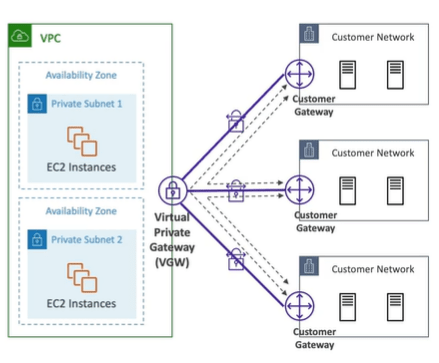
To establish a private connection over the public internet such as connecting (customer gateway) from on premises to (Virtual Private Network gateway) AWS. However, this connection is automatically encrypted and is also known as site to site VPN connection. It is easy to setup and takes few minutes to setup.
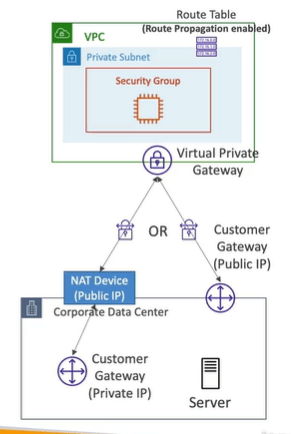
You use a Site-to-Site VPN connection to connect your remote network to a VPC. Each Site-to-Site VPN connection has two tunnels, with each tunnel using a unique public IP address. It is important to configure both tunnels for redundancy. When one tunnel becomes unavailable (for example, down for maintenance), network traffic is automatically routed to the available tunnel for that specific Site-to-Site VPN connection.
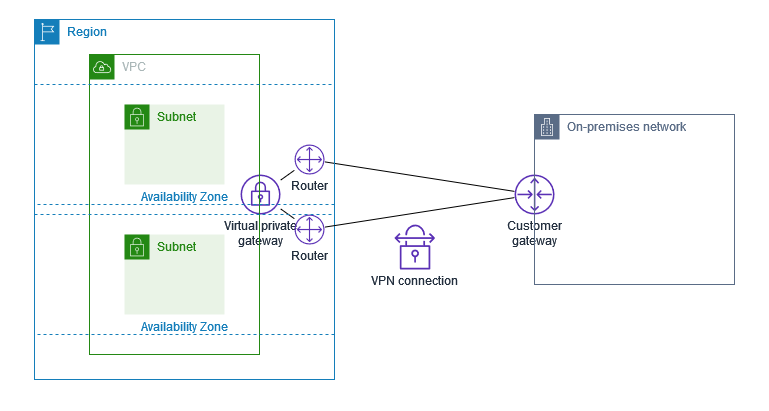
Virtual Private Gateway
- VPN concentrator on AWS side of VPN connection.
- VGW is created and attached to the VPC from which you want to create the site to site vpn.
Customer Gateway (On premises )
- Software application or physical device on customer side of the VPN connection.
- Public internet routable IP address for your customer gateway device.
- It can be Private IP if its behind a NAT device that’s enabled for NAT device.
How to setup site to site VPN in AWS Cloud
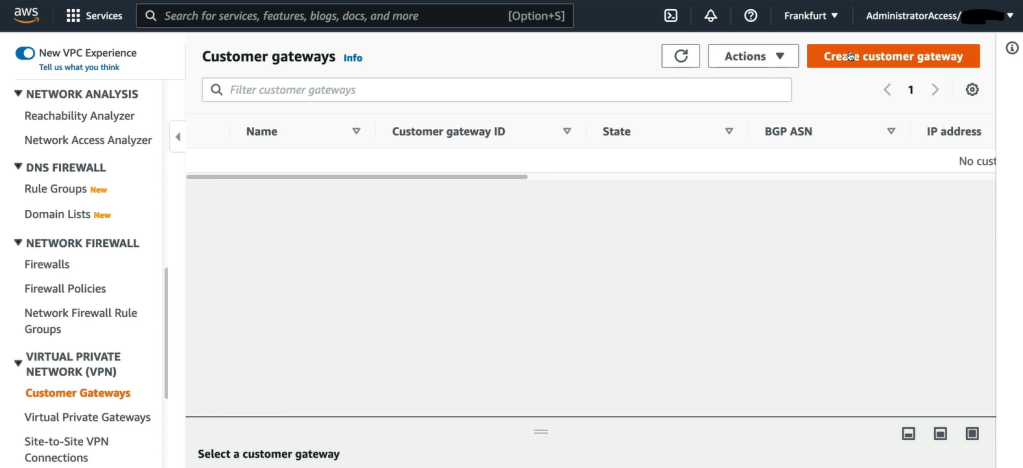
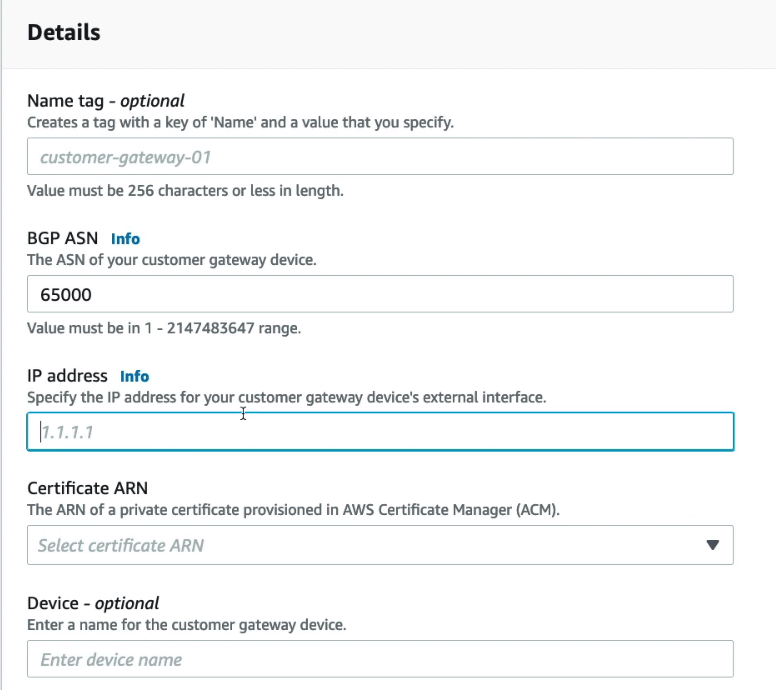
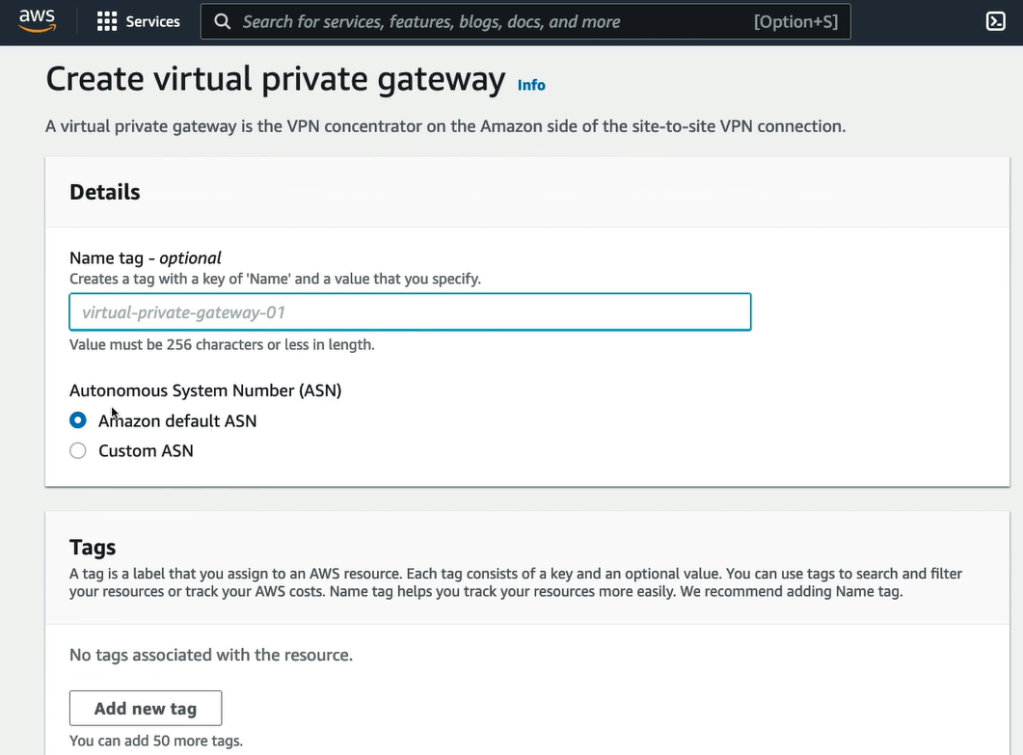
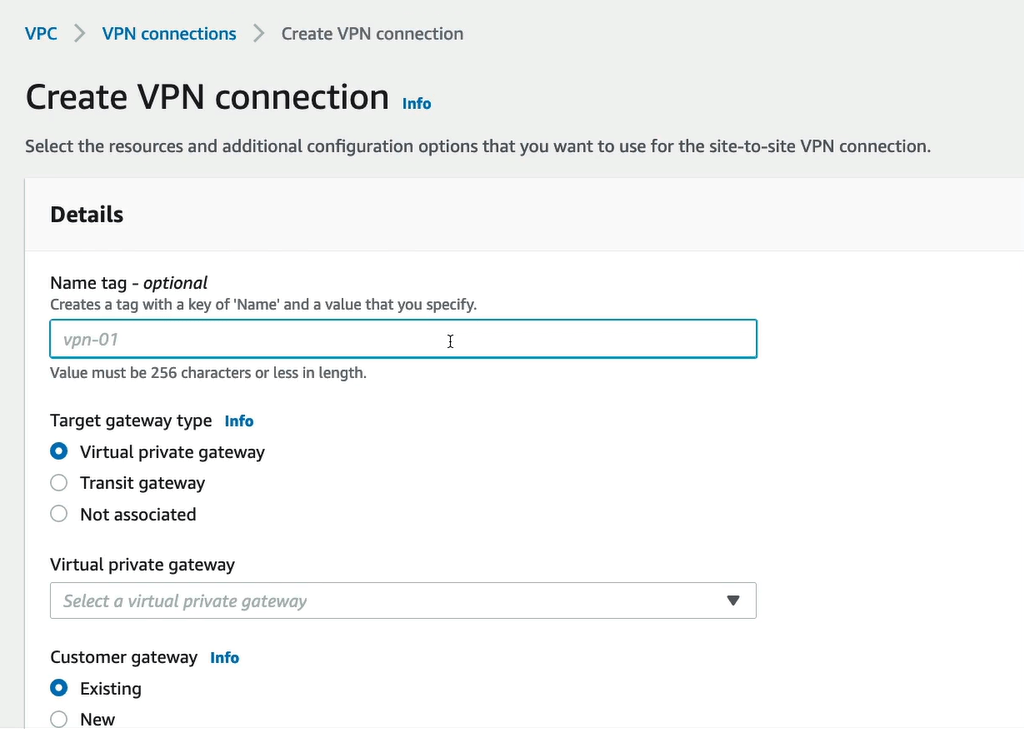
In order to setup site to site VPN in AWS Cloud, create customer gateway and virtual private gateway as shown below.
Note: IPV6 cannot be disabled for your VPC’s and subnet and they are public IP address. Your EC2 instances will get at least a private internal IPv4 and a public IPv6.
- Click on Create Customer Gateway to start creating the Customer gateway.
- Next, fill the details of the customer gateway.
- Now create the virtual private gateway on the Amazon side of site-to-site VPN connection.
- Further create the VPN connection.
AWS CloudHub
AWS CloudHub provides secure communication between multiple sites if you have multiple VPN connections. It is a VPN connection so it goes over the public.
For the above multiple VPN connections setup dynamic routing and configure route tables.
Direct Connect (DX)
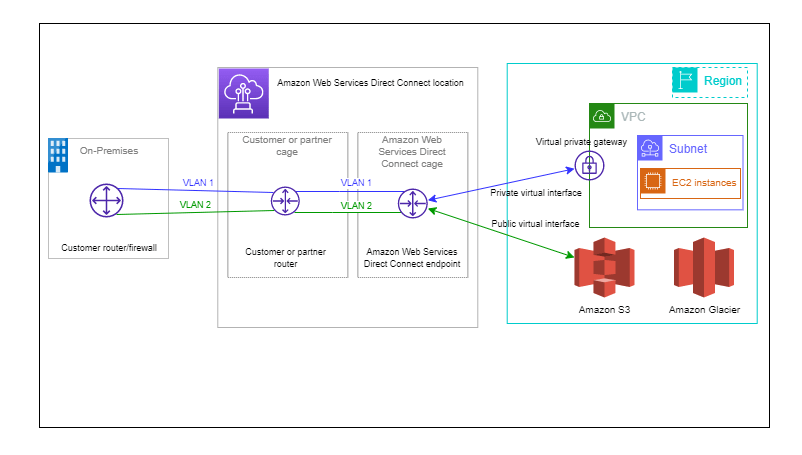
AWS Direct Connect links your internal network to an AWS Direct Connect location over a standard Ethernet fiber-optic cable. One end of the cable is connected to your router, the other to an AWS Direct Connect router. With this connection, you can create virtual interfaces directly to public AWS services (for example, to Amazon S3) or to Amazon VPC, bypassing internet service providers in your network path. An AWS Direct Connect location provides access to AWS in the Region with which it is associated. You can use a single connection in a public Region or AWS GovCloud (US) to access public AWS services in all other public Regions.
- With Direct Connect you need to establish the physical connection, which is secure, private and fast but takes at least a month to setup.
- Dedicated connection is a dedicated private connection between Data Center and AWS Direct connect locations. On AWS VPC side you need virtual private gateway.
- You can access both public and private resources on the same connection.
- It supports both the hybrid environments like on prem and cloud.
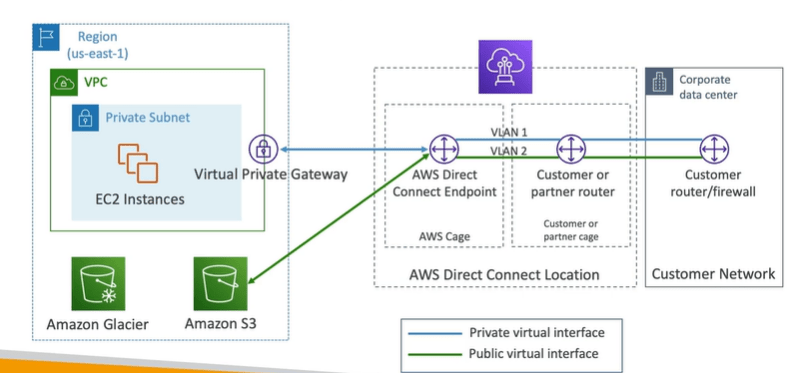
- If you want to setup a direct connect to one or more VPC in multiple regions ( same account ) you must use direct connect gateway.
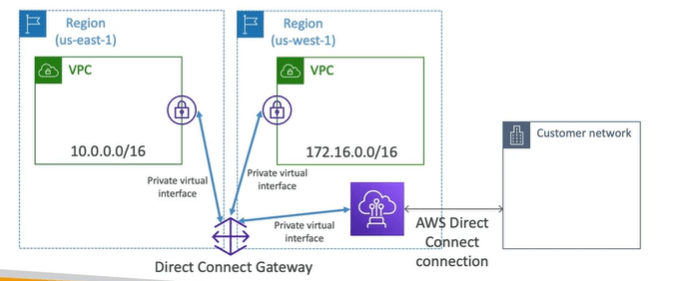

AWS Direct Connect Gateway
IF you need to setup direct connect to many VPCs in different AWS regions then you must setup direct connect gateway.
AWS Transit Gateway
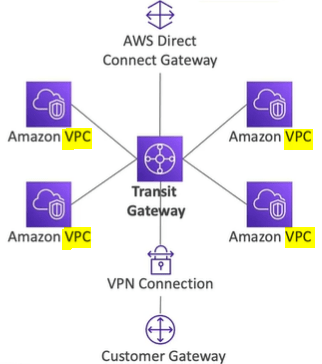
It is difficult to handle thousands of VPC Peering’s with VPC in AWS account or on premises. To solve this transit gateway is used which works with Direct connect gateway and VPC connections as well which we discussed earlier for Hybrid solution. Some of the other features of Transit Gateway are:
- You can peer Transit Gateways across regions.
- Works with Direct connect Gateway and VPN connections.
- Share cross account using Resource access manager ( RAM )
- You can limit which VPN can talk with other VPC using Route tables.
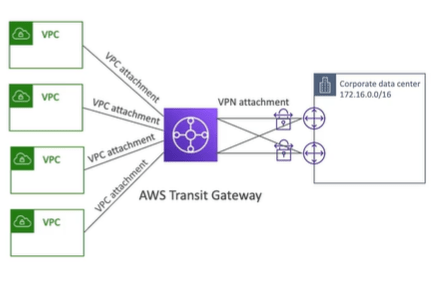
AWS Transit Gateway: Site to Site VPN ECMP
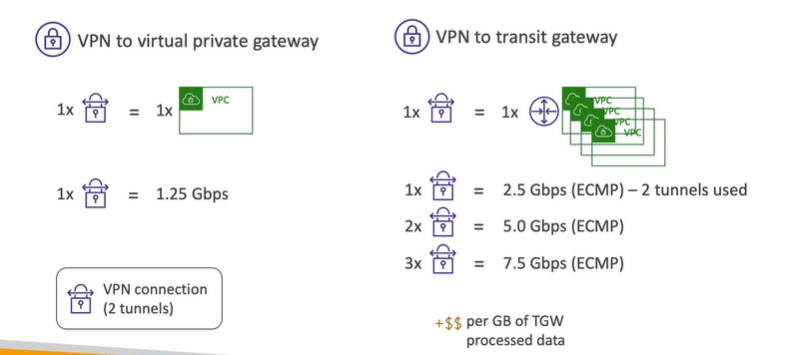
The Transit gateway in case of site to site VPN ECMP ( Equal cost multi path ) routing allow to forward a packet over multiple best part.
With this we can increase the bandwidth of your connection to AWS. Here below two tunnels are used which increase the bandwidth.
AWS VPC Traffic Mirroring
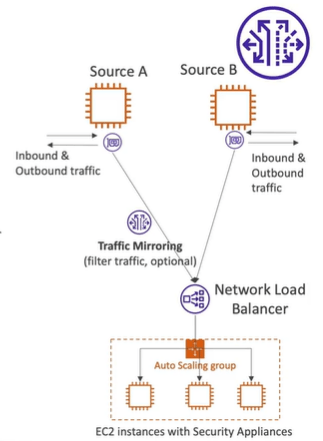
AWS VPC traffic mirroring is used to capture and inspect network traffic in VPC. Capture the traffic from source and targets such as ENI or network load balancer.
Egress only Internet Gateway
They are used only for IPv6 only which are similar to NAT Gateway but only for IPv6. It allows instance in your VPC for outbound connections over IPv6 while preventing the internet to initiate an IPv6 connection to your instances.
You must also update the route tables.
DDOS Protection (Distributed denial of services)
There can be various ways in which DDOS attacks are made in the AWS account and in order to get rid of these you can use the following services.
- AWS Shield approach protects against the DDOS attacks for your website and applications at no additional costs.
- AWS Shield Advanced: 24 * 7 premium DDOS Protection. They are costly.
- AWS WAF: Filter specific requests based on the rules. It is used at Layer 7 i.e., HTTP ad can be deployed at ALB, API Gateway and CloudFront. Here you also define Web ACL which includes IP address, HTTP header, block countries and HTTP Body.
- CF and Route53: They can be interlinked with AWS Shield and AWS WAF.
For Example:
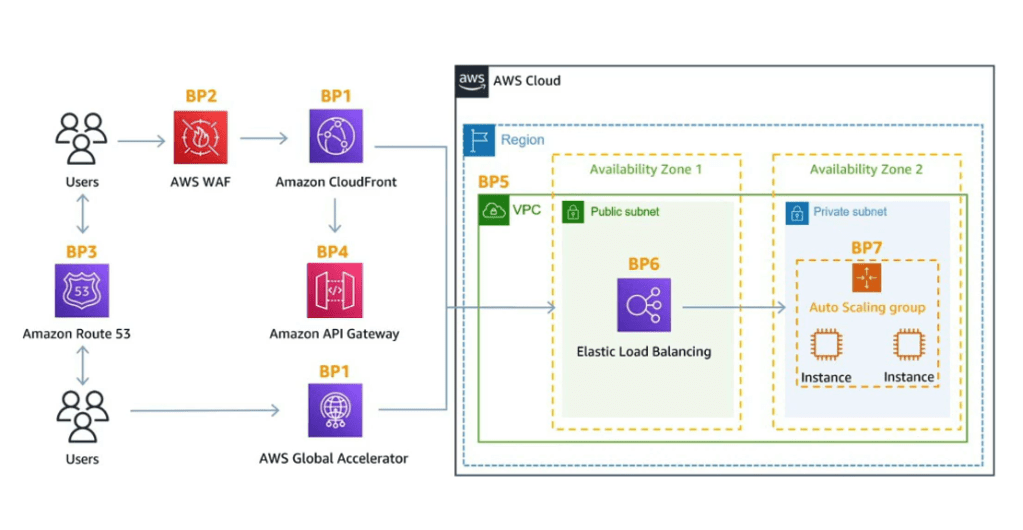
Note: You can do penetration testing on your AWS account for 8 services.
Data at Rest vs Data in Transit encryption
With data at rest, the data is not moving such as files in S3, RDS data etc but in case of data in transit it means the data is moving such as while uploading the AWS S3 bucket. There are multiple ways in which you can encrypt your data such as KMS.
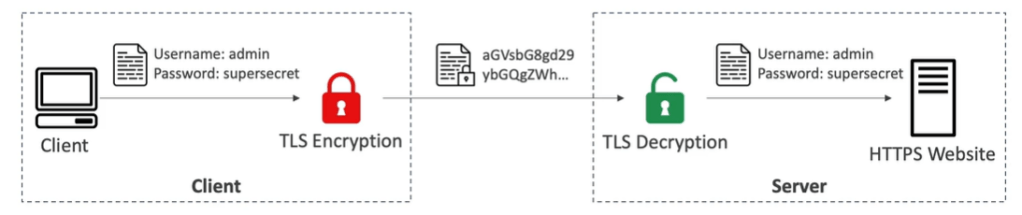
Encryption in Flight ( TLS / SSL)
- Data is encrypted before sending and decrypted after receiving.
- TLS Certificates help with encryption (HTTPS)
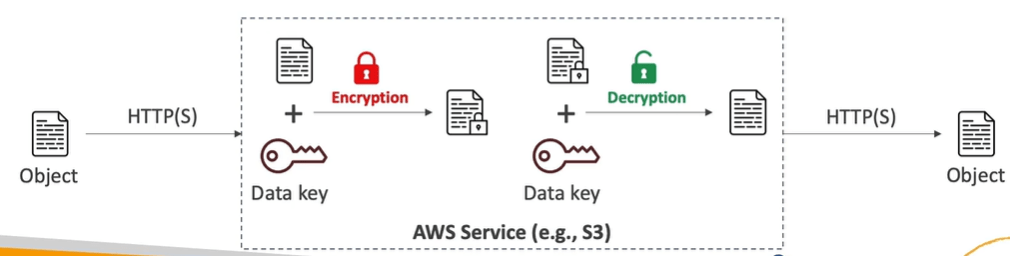
Server side encryption at rest
- Data is encrypted after being received by the server and decrypted before being sent.
- Keys help with the encryption.
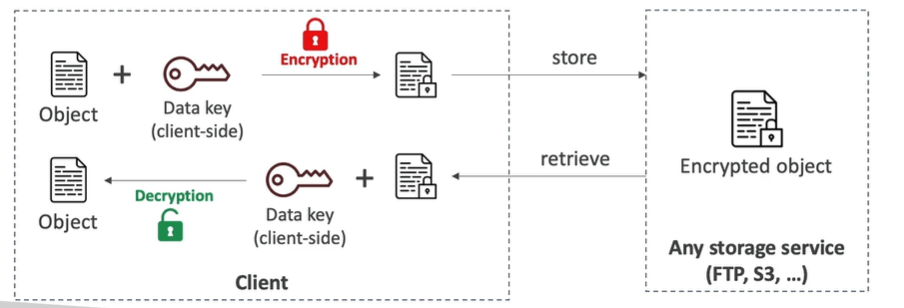
Client Side Encryption
- Data is encrypted by the client and never decrypted by server, it will be decrypted by the receiving client.
- It should also leverage envelope encryption.
AWS KMS (Key management service).
AWS KMS is completely managed by AWS.
- You can enable encryption on: EBS volumes, S3, Redshift database, EFS drives.
- Encryption automatically enabled for CloudTrail logs, S3 glacier, storage gateway.
CloudHSM
With AWS KMS, all the things are managed by Amazon however with CloudHSM AWS provides the dedicated encryption hardware and you manage your own encryption keys.
Customer Master Keys ( Paid)
- Customer Managed keys: Create, managed by customers.
- AWS managed CMK: Created and managed by AWS on customers behalf.
- AWS owned CMK: Collection of CMKS that is owned and managed by AWS.
- CloudHSM Keys: Keys generated from CloudHSM device
AWS Certificate Manager (ACM) or AWS ACM
With AWS ACM you manage and deploy SSL and TLS certificates easily. Also provide the in-flight encryption for HTTPS websites. Lets quickly checkout the features of AWS ACM.
- It supports both public and private TLS Certificates and public certificates are free of cost.
- The Automatic renew of TLS Certificate is also available.
- It integrates with AWS Load Balancer, Cloud front, API’s on API Gateway.
- You cannot use ACM with AWS EC2.
- You can also generate the certificate outside and then import the ACM

- ACM sends the daily expiration events starting 45 days prior to expiration. Later events will appear in EventBridge.

- You can also use AWS Config to set a managed rule named ( acm-certificate-expiration-check) to check for expiring certificates.
Integrating API Gateway with AWS ACM
Firstly lets discuss the three endpoints types in API Gateway.
- Edge optimised: For global clients
- Regional: For clients in same region
- Private: Can be accessed from your VPC using VPC endpoint (ENI)
Requesting Public Certificates
- List domain name to be included in the certificates.
- Fully qualified domain name
- Wildcard domain
- Select Validation Method : Domain validation or email validation
- Later it will take few hours for verification and public certificate will be enrolled.
AWS Firewall Manager
AWS Firewall manager is used to manage rules in all accounts of an AWS organization. It also manages security policy which contains WAF rules, AWS shield advanced, security groups of EC2, AWS Route 53 etc. So basically it can be used on top of AWS WAF.
Artifact
To fetch and view all the AWS compliance documents and AWS agreements.
- Artifact reports allows you to download the AWS security and compliance documents.
- Artifact Agreement allows you to review and accept the track of status of AWS agreements.
AWS Guard Duty
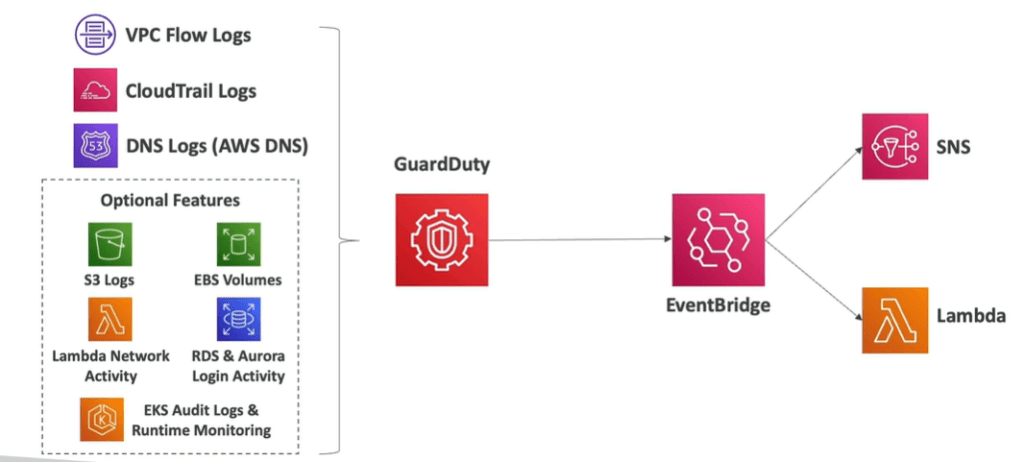
AWS Guard duty is an intelligent threat discovery tool to protect the AWS account which uses machine learning algorithms and it takes a single click to enable this . You can also use it for 30 days as a free service.
It checks logs such as: unusual API calls, unusual internal traffic, suspicious activities on your AWS account. ( VPC flow logs, CloudTrail logs, DNS logs, EKS audit logs).
It is also integrated with CloudWatch events and then using SNS and lambda triggers the notifications.
Note: Amazon Machine is also fully managed data security and privacy service that uses machine learning and pattern matching to protect your sensitive data in AWS.
Amazon Inspector
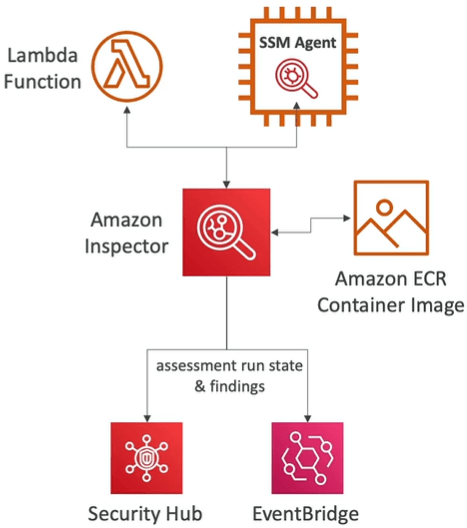
Amazon Inspector is used for performing automated security assessments and continuous scanning of infrastructure. It also detects the securities in AWS amazon cloud on various services such as AWS ECR, AWS EC2 instance by using AWS system manager agent (SSM) and also integrates with AWS security hub for reporting the issues and finally sends the finding to Amazon Event bridge.
Inspector is similar to AWS Config which also audits and records compliance of your AWS resources.
AWS Security HUB
Central security tool that manages security across several AWS accounts and automates security checks. It has an integrated dashboard showing all current security and compliance status to quickly take actions.
It integrates with AWS Inspector, Guard duty, Macie, IAM access analyser, AWS systems manager, firewall manager as well.
But in order for AWS security hub you need to enable AWS config service.
AWS Detective
For More deeper analysis which are not done by inspector or guard duty or Macie you need a tool which is Amazon Detective using ML and graphs.
AWS Macie
AWS Macie is fully managed data security and data privacy service that uses machine learning and pattern matching to discover and protect sensitive data in AWS. AWS Macie will identify and alert you to sensitive data such as personally identifiable information.

AWS Abuse
Report suspected AWS resources for abusive or legal purposes such as port scanning, spam, DDOS attacks, malware.
Mail to abuse@amazonaws.com
AWS Rekognition or Amazon Rekognition
AWS Rekognition or Amazon Rekognition finds objects, texts, scenes in images and videos using ML. It also performs facial analysis, Facial search to do user verification. The use case of AWS Rekognition or Amazon Rekognition are text detection, face detention, age, celebrity recognition.

AWS Transcribe
AWS Transcribe automatically convert speech into text. It uses deep learning process called Automatic speech recognition (ASR). AWS Transcribe supports automatic language identification for multi-lingual audio. The use cases of AWS Transcribe are such as customer service calls.
AWS Polly
AWS Polly turns text into speech using deep learning. AWS Polly allows you to create applications that talk. AWS Polly uses Lexicon and SSML.
AWS Translate
AWS Translate allows you to translate the language into different languages. AWS Translate uses Natural and accurate language translation.
AWS Lex and AWS connect
AWS Lex uses same technology that is used by Amazon Alexa, which uses Automatic speech recognition. Amazon connect is a virtual contact center that allows you to receive calls, create contact flows, Intent recognized.
AWS Comprehend
AWS Comprehend is serverless and fully managed services that uses Machine learning to find insights and relationships in text such as key phrases, analyse text using tokenization of speech. Ex: analyse the negative and positive experience.
AWS Sagemaker
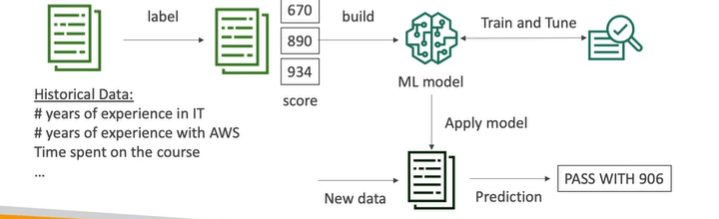
AWS Sagemaker is fully managed service for developers or scientist to build Machine learning model such as predict exam score. It performs labelling, building, train and tune and finally process new data.
AWS Forecast
AWS Forecast is fully managed service that uses ML to deliver highly accurate forecasts. For example: predict the sales of a product etc.
The use cases of AWS Forecast are product demand planning, financial planning, resource planning.
AWS kendra
AWS Kendra is fully managed document search service that uses ML to extract answers within documents such as text , pdf, html, PowerPoint etc.
AWS Personalize
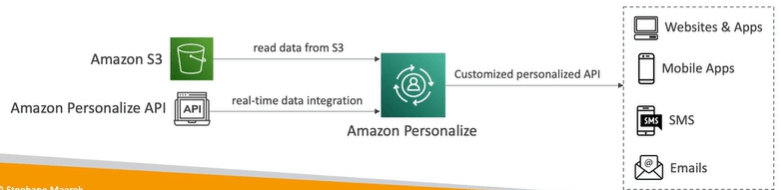
AWS Personalize is fully managed service that uses ML to build apps with real time personalised recommendations. For example ranking of objects. It integrates into websites, applications, SMS, email marketing’s etc.
Use case of AWS Personalize are retail stores, media and entertainments.
AWS Textract.
AWS Textract is fully managed service that uses ML to extract text and data from any scanned documents using AI and ML.
You can extract the data in the form of tables and forms. It also reads and process any types of document it could be PDF, images, etc.

AWS Organizations
It is a global service that manages multiple AWS account. The main account is the master account that is management account and other accounts are known as member accounts. The benefit of AWS organizations is the consolidated billing across all accounts.
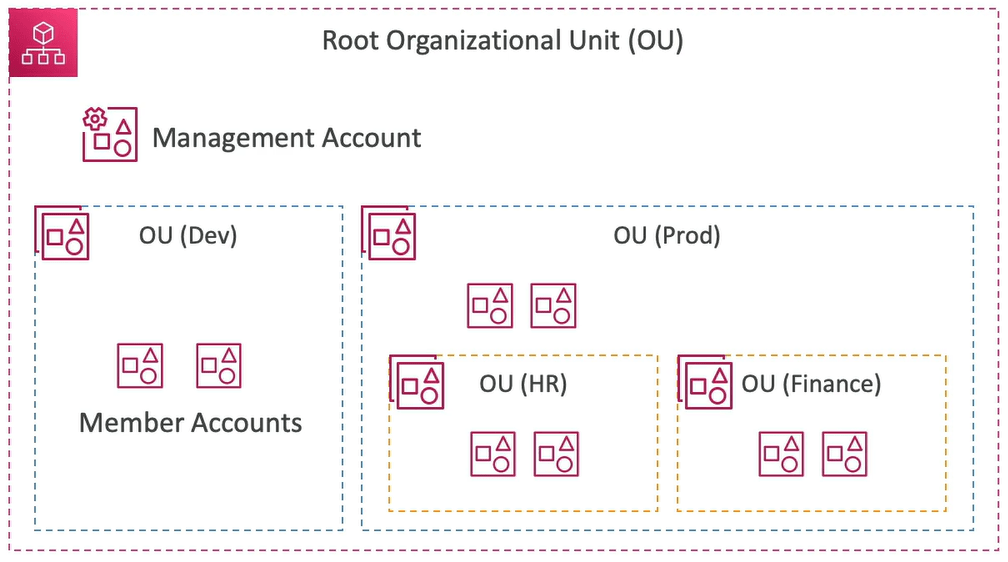
You can also automate the AWS account creation and you can restrict the account privileges using Service control policies (SCP).
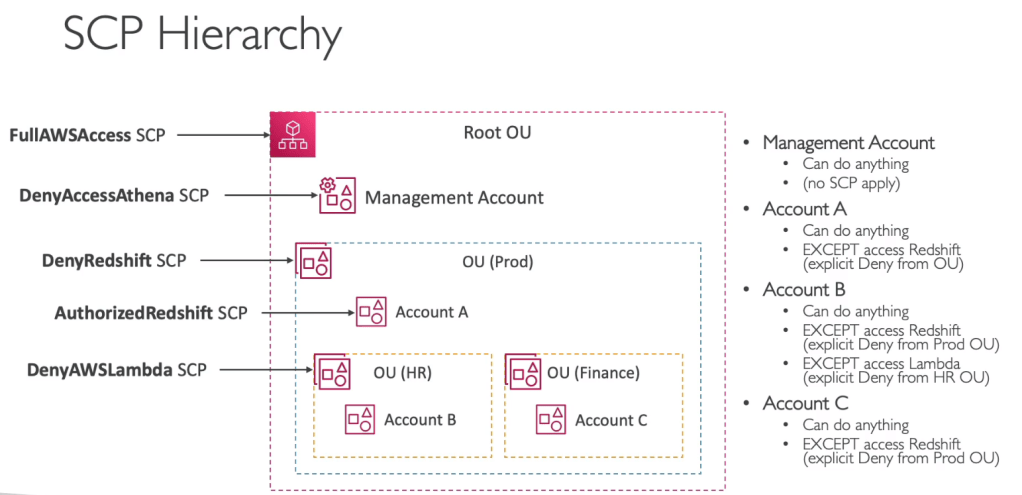
- With SCP you can whitelist or blacklist IAM actions.
- Applied at OU or Account level.
- You cannot apply SCP to master account as it can do anything. Master account is also known as management account.
- SCP is applied to all users and roles of the Account including root.
Advantages of AWS Organizations
There are multiple benefits of AWS Organizations such as:
- Multi account vs One account
- It also uses tagging standards for billing purposes.
- Enables CloudTrail on all accounts and send logs to central AWS S3 account.
- Send CloudWatch Logs to central logging accounts.
- Establish cross account roles for admin purposes.
- IAM policies applied to OU or Accounts to restrict users and roles (SCP). They don’t apply to management account.

How to Create AWS Organizations

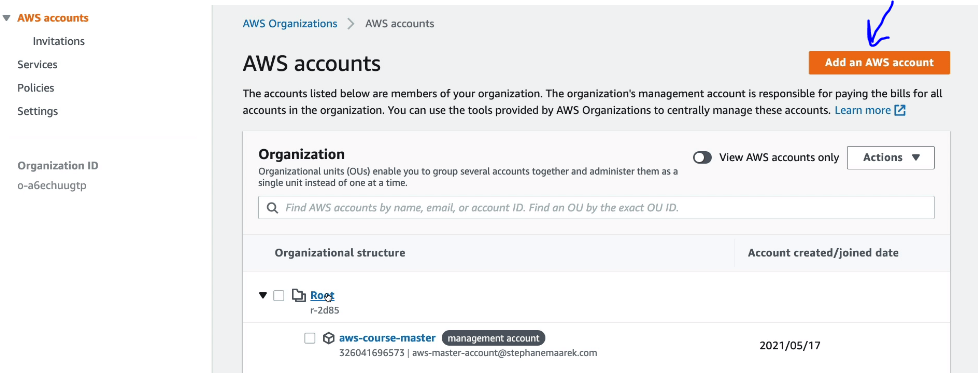
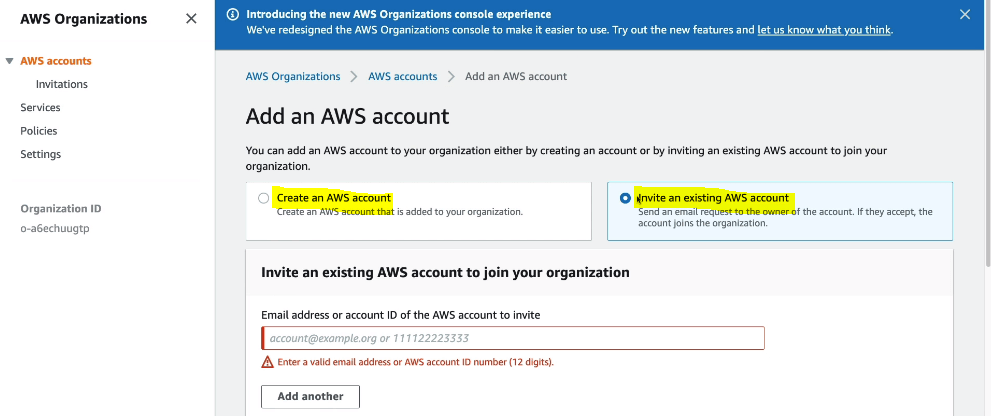
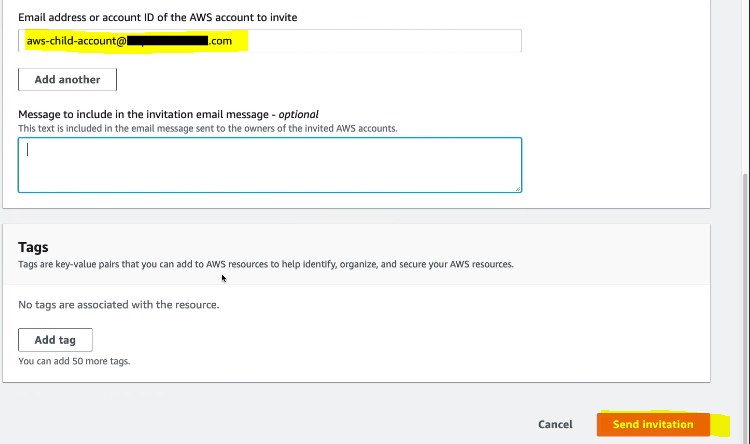
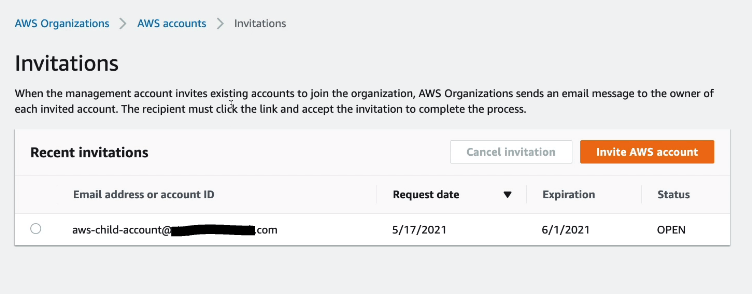
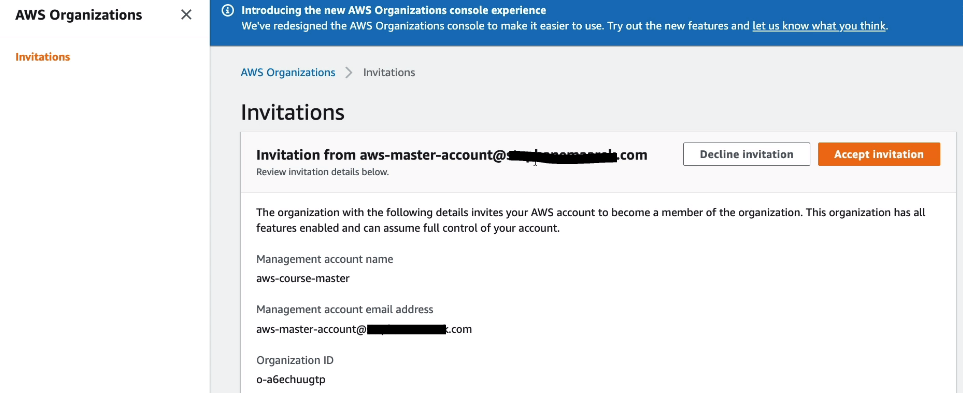
- On Child AWS account you will see an invitation as shown below.
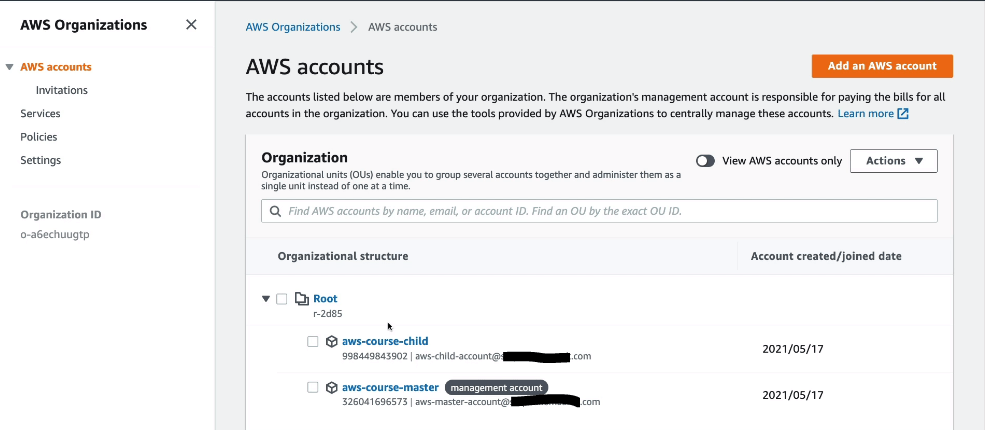
- Once you AWS accounts are connected then you will see on master or management account something like below.
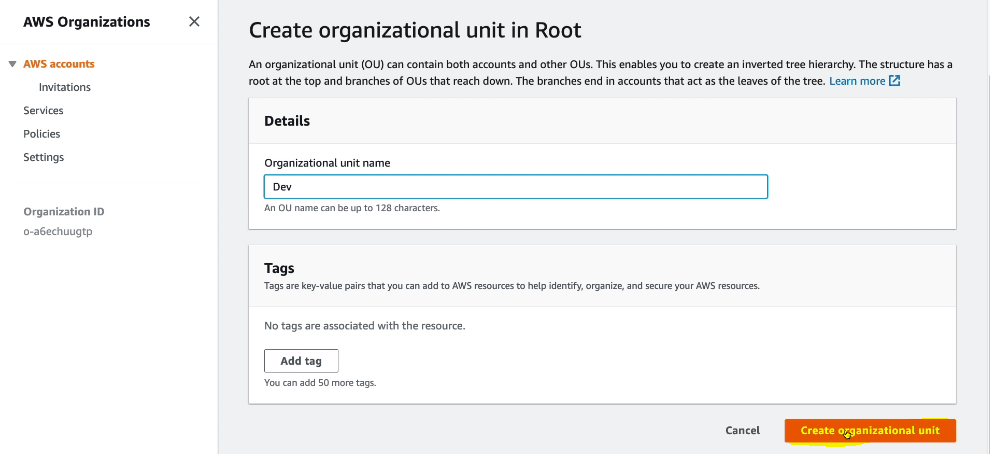
- To create new organization unit, under the root, click on Actions and then create new. We create new OU so that we can apply policies on the OU.

What is AWS Control Tower ?
AWS Control Tower is an easy way to setup and govern a secure and compliant multi-account AWS environment based on best practices. AWS runs on top of AWS organizations. It automatically set up the AWS organizations and implement SCP’s.
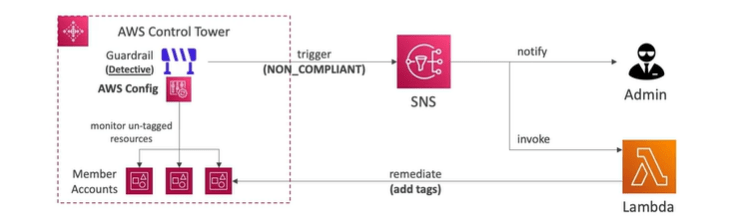
It setup your environments in a few clicks. Also it automate ongoing policy management using guardrails. Even it detects policy violations and remediate them.
- Guardrails provides ongoing governance for your control tower environment. There are two types of Guardrails such as:
- Preventive guardrail: It uses SCP
- Detective guardrails: It uses AWS Config
When you switch to AWS Control Tower console you will see: Set up Landing Zone
Pricing Models in AWS
- Pay as you go
- Save when you reserve
- Pay less by using more
- Pay less as AWS grow
Free Services
IAM, VPC, Consolidated billing, Elastic beanstalk, CloudFormation, Autoscaling groups. You only pay for resources created.
Cost Calculations
On demand EC2
- Minimum of 60 seconds
- Pay per second or pay per hour
Reserved Instances EC2
- 1 to 3 years of commitment
- Up to 75% discount as compared to on demand
Spot Instances EC2
- Up to 90% discount compared to on demand
Dedicated Host EC2
- On demand
- Reservation for 1 to 3 years
Lambda
- Pay per call
- Pay per duration
ECS
- No additional fees except the underlying EC2 instances.
Fargate
- You only pay for vCPU and memory resources allocated to your applications in your containers.
AWS S3
- Depends on the storage class.
- Depends on number and size of objects
- Depends on number and type of requests.
- Data transfers out of AWS S3 region.
- S3 Transfer acceleration.
- Lifecycle transitions.
AWS EBS
- Volume type (based on performance)
- Storage volume in GB.
- Snapshots
- Data transfer.
AWS RDS
- Per hour billing.
- Depends on engine, size and memory class used.
- Purchase type (on demand or reserved instances)
- Number of requests
- Deployment types (single AZ or multi AZ’s)
- Additional storage.
AWS CloudFront
- Pricing based on different location.
- Data transfers out
- Depends on Number of HTTP/HTTPS requests
- Storage volume in GB.
- Snapshots
- Data transfer.
AWS Cost optimizer
- Helps you choose the optimal configurations and right size your workloads.
- Reduce costs and improve performance by optimizing the resources.
- Use Machine learning to analyse your resources configurations and their utilizations.
Billing Overview
- Estimate cost: Pricing Calculator (calculator.aws)
- Tracking costs: Billing dashboard, cost allocation tags, cost and usage reports- deep dive into cost and usage data available.
- Cost explorer– it also gives current usage and forecast usage details of all AWS accounts. It also allows you to create custom reports.
- Monitoring against costs plan: billing alarms and budgets.
Trusted Advisor
Analyse your AWS accounts on 5 categories. You dint need to install AWS account assessments.
- Cost optimization
- Performance
- Security
- Fault tolerance
- Service limits
AWS Trusted advisor comes with business and enterprise support plan.
AWS Support Plans
- Basic Support
- Performance
- Security
- Fault tolerance
- Service limits
AWS STS (Security Token Service)
- Enables you to create temporary, limited privileges credentials.
- For Example, when a use assumes the role then STS service sends the temporary security credentials.
- IAM role for EC2, in which EC2 gets temporary credentials for EC2 to access AWS resources.
- Identity federation which manages user identity in external systems and provide them STS tokens to access AWS resources.
- IAM roles for cross and same account access.
What is AWS Cognito ?
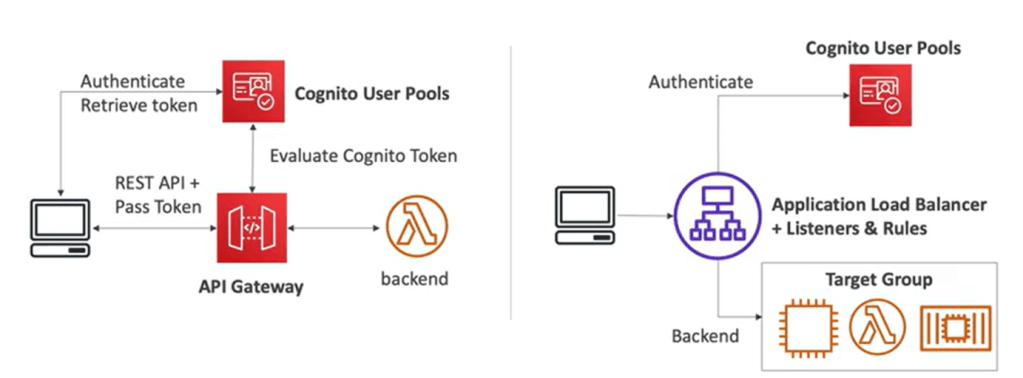
This service is used for users to interact with web and mobile application users. Instead of IAM user we create users in cognito service. This users sit outside of AWS account.
- Cognito user pools:
- Sign in functionality for app users and integrates with API Gateway , ALB.
- It is serverless db of users for web and mobile apps.
- Email and phone authentication
- MFA
- Simple login using username and password.
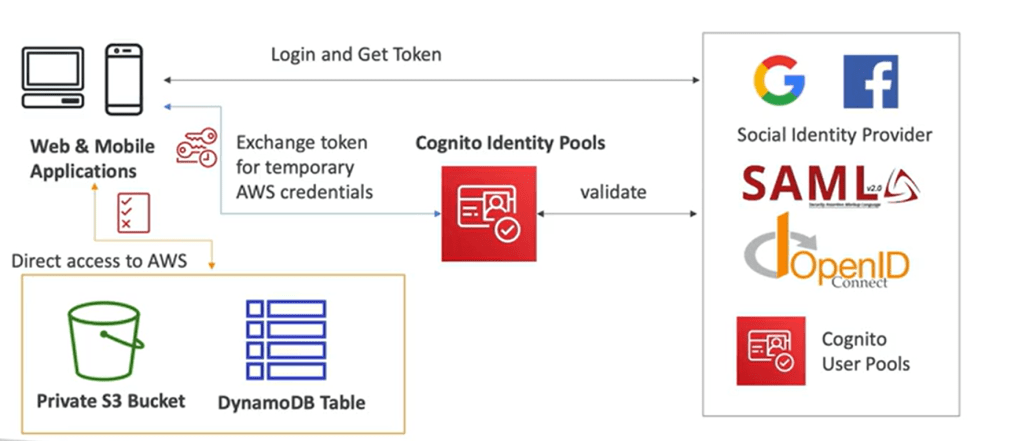
- Cognito Identity Pools:
- Provide AWS credentials to users to access AWS resources directly rather than using lambda or API gateway to connect to AWS services.
- It integrates with Cognito user pools as identity provider.
- IAM polices applied to credentials are defined in Cognito.
- Default IAM roles for authenticated and guest users.
- They can be customized based on user_id for fine grained control.
AWS DIRECTORY SERVICES (HYBRID)
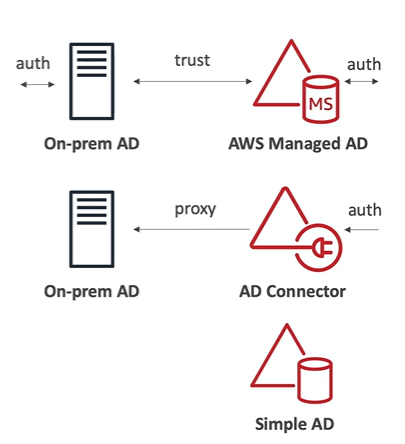
AWS Directory service allows you to create Microsoft active directory on AWS account.
- AWS Managed Microsoft AD: Create your own AD in AWS where you create users, MFA, establish trust with on premises AD. Here trust means if users are not found in AWS then it can go and find out the same in on premises.
- AD Connector: Directory Gateway (proxy) to redirect to on premises AD, users are managed on the on-premises AD. It also supports MFA. AD connector is a proxy for redirecting directory requests to your existing Microsoft Active directory without caching any information in the cloud.
- Simple AD: AD compatible managed directory on AWS. Cannot be joined with on premises. These are powered by a Linux Samba active directory compatible server.
IAM Identity Center to Setup Active Directory
There are two ways to connect to AD, one is to connect to AWS Managed Microsoft AD and the other is to connect to self managed directory.

AWS IAM Identity Center ( AWS Single Sign on )
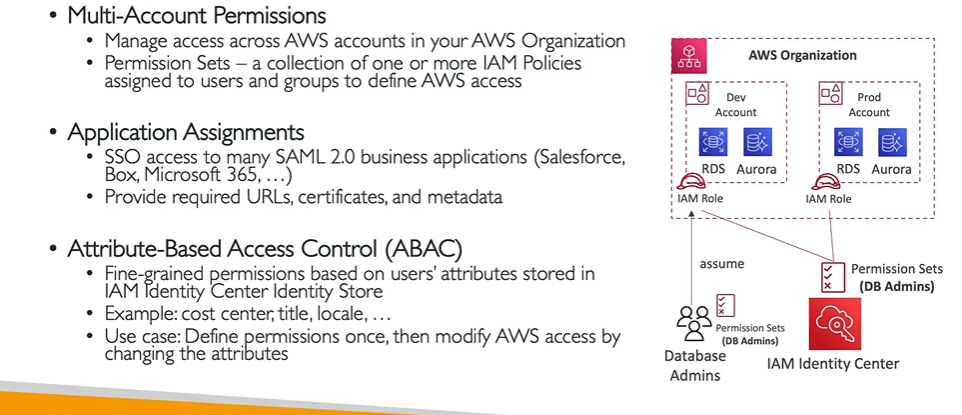
AWS IAM Identity Center is the recommended AWS service for managing human user access to AWS resources. It is a single place where you can assign your workforce users, also known as workforce identities, consistent access to multiple AWS accounts and applications.
With IAM Identity Center, you can create or connect workforce users and centrally manage their access across all their AWS accounts and applications. You can use multi-account permissions to assign your workforce users access to AWS accounts.
It is for one login for all your AWS accounts in AWS organizations. It is also applicable for business cloud applications such as salesforce, box, Microsoft 365, SAML enabled application and EC2 windows instance.
You also have identity providers built in identity store in IAM identity center. Some of 3rd party identity providers are active directory, OneLogin, Okta.
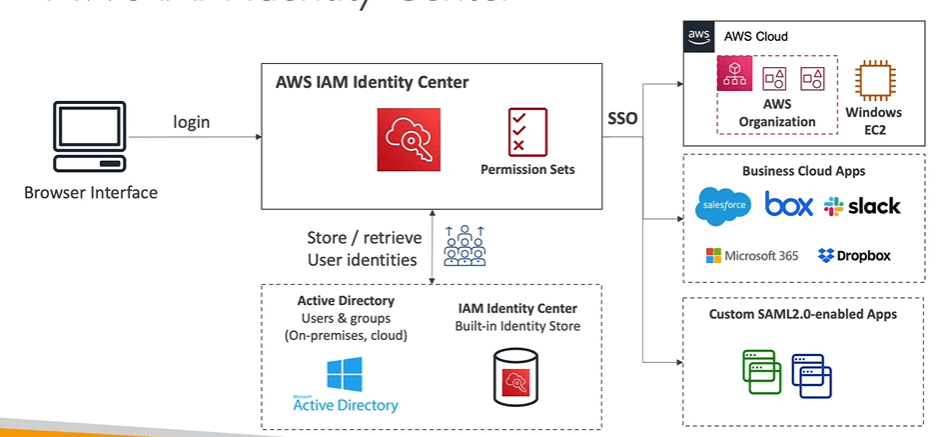
In the below image you will see that the permissions are assigned according to groups.
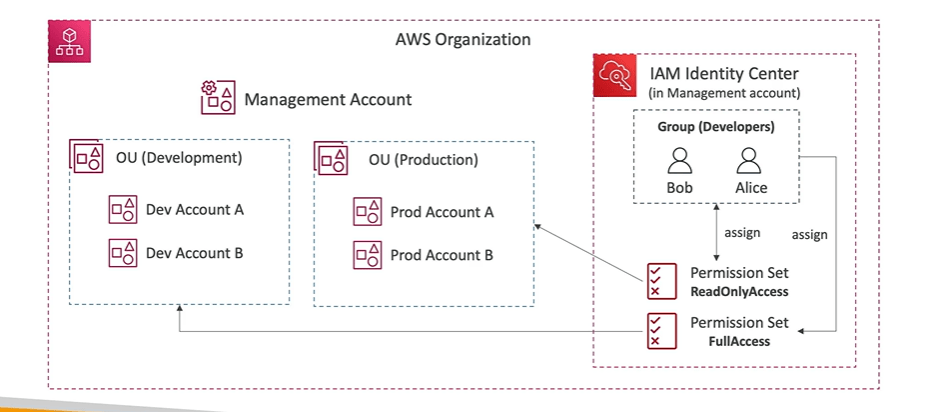
- AWS Identity Center Fine grained permissions and assignments
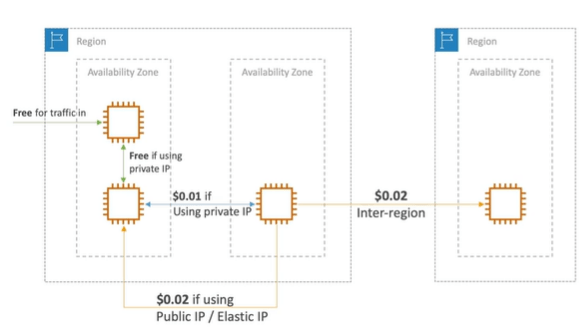
Networking Cost in AWS
AWS Network Firewall
AWS Firewall manager manages all the network related securities across all accounts however to manage entire AWS VPC you can use AWS Network firewall such as VPC to VPC traffic, outbound to internet, to/from direct connect and site to site VPN. The AWS Network firewall also contains the rules which can also be centrally managed cross account by AWS Firewall manager.
Network firewall supports 1000’s of rules such as IP and port rule, protocol, stateful, regex pattern etc.
Amazon Simple Email Service ( Amazon SES )
Amazon SES is fully managed service to send emails securely, globally and at scale. It allows inbound and outbound emails.
It also provides stats such as email deliveries, bounces etc.
AWS Pinpoint
AWS Pinpoint is scalable marketing communication service which supports email, SMS, push, voice and in app messaging. It also scales to billions of messages per day. It is enhanced version of AWS SNS as it is highly targeted segments and full campaigns.
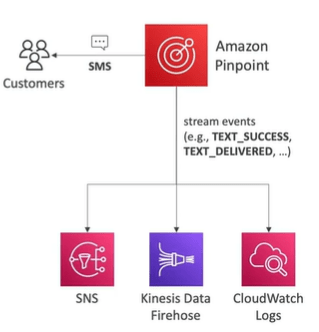
What is AWS Amplify?
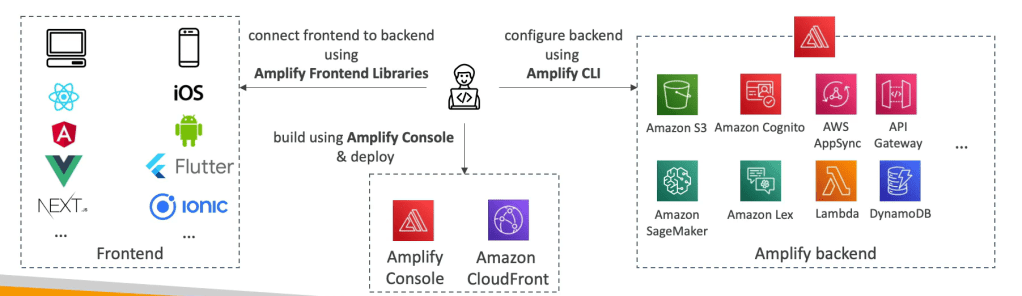
A set of tools and services that helps you develop and deploy scalable full stack web and mobile applications.
You can do monitoring, authentication, storage etc.
You can connect your source code from GitHub, AWS Code commit, bitbucket, GitLab or upload directly.
Well Architected Framework
There are 6 pillars for Well Architected Framework such as:
- Operational Excellence
- Security
- Relaiblility
- Performance efficeincy
- cost optimisation
- Sustainability.
Everything you need to know about AWS Elasticbeanstalk
AWS Elasticbeanstalk allows you to quickly deploy and manage applications in the AWS cloud without learning about the infrastructure that runs those applications.
Elastic Beanstalk supports applications developed in Go, Java, .NET, Node.js, PHP, Python, and Ruby.

There is no additional charge for Elastic Beanstalk. You pay only for the underlying AWS resources that your application consumes.
AWS Elastic beanstalk concepts
Application
Application is logical collection of elastic beanstalk components including environments, versions, environment configurations.
Application Version
In a running environment, you can deploy any application version you already uploaded to the application, or you can upload and immediately deploy a new application version.
To upload a new application or application version you will need to upload a source bundle which should be single zip file not exceeding 500 MB and shouldn’t include a parent folder.
Environment
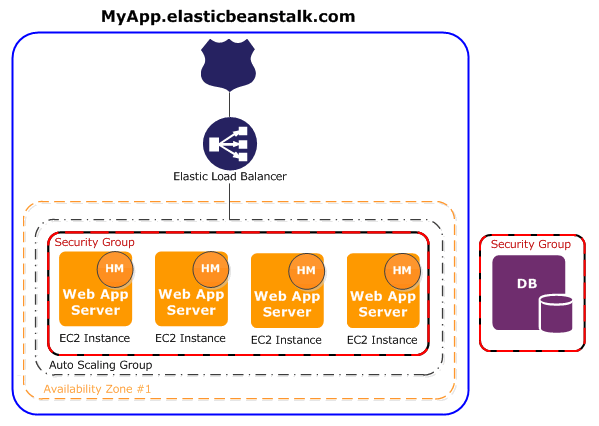
Environment is collection of AWS resources running an application version.
Platform
A platform is a combination of an operating system, programming language runtime, web server, application server, and Elastic Beanstalk components.
Web Server Environments
Worker Environments
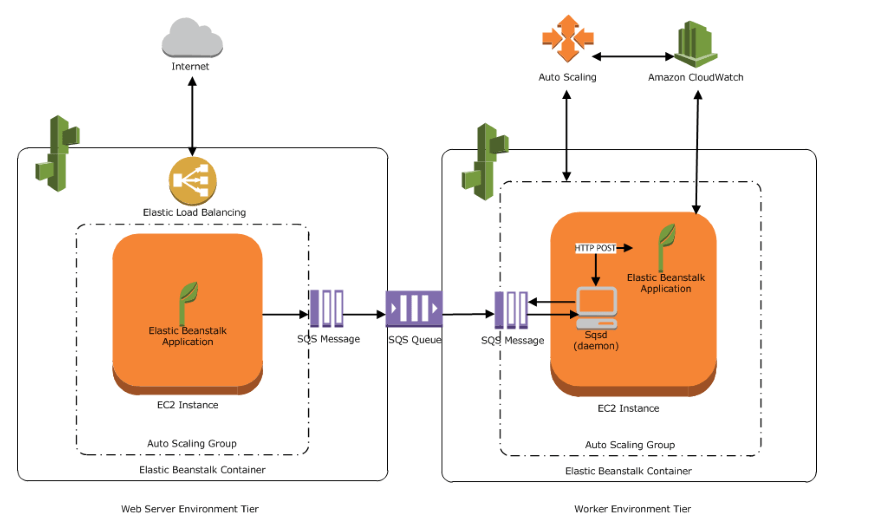
When you launch a worker environment, Elastic Beanstalk installs the necessary support files for your programming language of choice and a daemon on each EC2 instance in the Auto Scaling group. The daemon reads messages from an Amazon SQS queue. The daemon sends data from each message that it reads to the web application running in the worker environment for processing.
Creating an Application and Environment in AWS Elastic beanstalk
To create an application and environment you need to perform the following steps.
- Open the Elastic Beanstalk console.
- Choose Create application and For Platform, choose a platform.
- Choose Use an existing service role for Service Role and EC2 instance profile.
- Launches an environment named GettingStartedApp-env with these AWS resources:
- An Amazon Elastic Compute Cloud (Amazon EC2) instance (virtual machine)
- An Amazon EC2 security group
- An Amazon Simple Storage Service (Amazon S3) bucket
- Amazon CloudWatch alarms
- An AWS CloudFormation stack
- A domain name
- Creates a new application version named Sample Application.
- A domain name that routes to your web app in the form
subdomain.region.elasticbeanstalk.com.
Deploy a new version of your application
Perform the below steps:
- Choose Environments, and then choose the name of your environment from the list.
- On the environment overview page, choose Upload and deploy.
- Choose Choose file, and then upload the sample application source bundle that you downloaded and Choose Deploy.
Deploying applications to Elastic Beanstalk environments
Each deployment is identified by a deployment ID. Deployment IDs start at 1. There are different deployment policies which are used in AWS Elastic beanstalk environments,
- All at once: Deploy the new version to all instances simultaneously.
- Rolling: Deploy the new version in batches.
- Rolling with additional batch: Deploy the new version in batches, but first launch a new batch of instances to ensure full capacity during the deployment process.
- Immutable: Deploy the new version to a fresh group of instances by performing an immutable update.
- Traffic splitting: Deploy the new version to a fresh group of instances and temporarily split incoming client traffic between the existing application version and the new one.
Elastic Beanstalk provides one managed policy for enhanced health monitoring, and another one with additional permissions required for managed platform updates (AWSElasticBeanstalkManagedUpdatesCustomerRolePolicy)
 Automate Infra