
Amazon Simple Queue Service (SQS) is a powerful tool that revolutionizes the way developers manage message queues. With SQS, you can effortlessly transmit any volume of data, at any level of throughput, without losing messages or requiring other services to be available.
This blog post will delve into the essentials of SQS, showcasing its benefits and how it simplifies the task of message handling in cloud computing. Whether you’re a seasoned developer or just starting out, understanding SQS can significantly enhance your applications’ scalability and reliability. Let’s explore the magic of SQS together!
What is AWS SQS or Amazon SQS?
The main benefit of AWS SQS service is it allows us link communication between various AWS services. Direct communication between services might causes issues at times such as sudden spikes of traffic. So in these cases it is better to use SQS queue model, SNS module, Kinesis real time streaming model.
In AWS SQS service the producers sends the message to queue and consumers polls the message from the queue. It scales from 1 message to 10000’s messages per second. There is no limit to how many messages can be in queue. Also, the messages are deleted once read by the consumers.

Characteristics of SQS
- Amazon Simple Queue Service (SQS) is fully managed service which is used to decouple applications. It also allows you to control who can send and receive messages
- unlimited throughput, unlimited number of messages in queue.
- default retention of messages is 4 days and maximum is 14 days.
- Producer will send the message using SDK (Send Message API).
- Consumers may run on Ec2, AWS Lambda or on premises servers.
- Consumers receive and process messages in parallel.
- Consumers delete messages after processing them.
- In SQS you create the queue either standard or FIFO.
- You can also purge the queue where all messages are stored.
Processing of Message in AWS SQS
 A producer (component 1) sends message A to a queue, and the message is distributed across the Amazon SQS servers redundantly.
 When a consumer (component 2) is ready to process messages, it consumes messages from the queue, and message A is returned. While message A is being processed, it remains in the queue and isn’t returned to subsequent receive requests for the duration of the visibility timeout.
 The consumer (component 2) deletes message A from the queue to prevent the message from being received and processed again when the visibility timeout expires.
IAM Policy to access AWS SQS Queue
Who can access your SQS queue is defined in the below AWS policy
{
    "Version": "2008-10-17",
    "Id":    "PolicyforAmazonSQS",
    "Statement": [
        {
             "Sid": "AllowSQSPrincipal",
             "Effect": "Allow",
             "Principal":  {
                     "AWS": "8532635625356"
             },
             "Action": [
                "SQS:*"
             ],
             "Resource": "arn:aws:sqs:us-east-1:8532635625356:demo-sqs"
             }
        ]
     }
}
Decouple Applications using AWS SQS
You can send and receive messages using SQS service between two applications. below is the example of applications that need to enable autoscaling and insert the data into AWS S3.

AWS SQS Security
You can enable security in AWS either in flight using HTTPS API or at rest using KMS keys. You can also use client side encryption if client wants to perform encryption and decryption.
You can also control access based on IAM policies.
Finally you can also use SQS access policies which are similar to AWS S2 bucket policies which are useful for cross account access and allowing other services to write to an AWS SQS queue.
Different types of AWS SQS Queue
Amazon SQS supports two types of queues – standard queues and FIFO queues.
Standard Queue
- Standard queues support a very high, nearly unlimited number of API calls per second, per action (
SendMessage,ReceiveMessage, orDeleteMessage - Guaranteed at-least-once delivery, meaning that every message is delivered at least once, but in some cases, a message may be delivered more than once due to retries or network delays.
- provides best-effort ordering, meaning that while Amazon SQS attempts to deliver messages in the order they were sent, it does not guarantee this.
- Standard queues ensure high durability by storing multiple copies of each message across multiple AWS Availability Zones.
- Amazon SQS allows you to configure a visibility timeout to control how long a message stays hidden after being received, ensuring that other consumers do not process the message until it has been fully handled or the timeout expires.
- Use standard queues to send data between applications when throughput is crucial
FIFO Queue
- When you use batching, FIFO queues process up to 3,000 messages per second per API method (
SendMessageBatch,ReceiveMessageBatch, orDeleteMessageBatch). - FIFO queues deliver each message once and keep it available until you process and delete it. By using features like
MessageDeduplicationIdor content-based deduplication, you prevent duplicate messages, even when retrying due to network issues or timeouts. - First-in-first-out delivery – FIFO queues ensure that you receive messages in the order they are sent within each message group.
- Use FIFO queues to send data between applications when the order of events is important,
Creating a AWS SQS Standard Queue in AWS
- Navigate to AWS console and Open the Amazon SQS console. Choose Create queue.

- For Type, the Standard queue type is set by default.

- Under Configuration, you can set new values for the following parameters
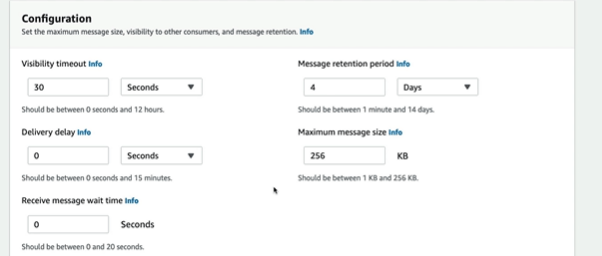
- Amazon SQS provides managed server-side encryption by default. To choose an encryption key type, or to disable Amazon SQS managed server-side encryption, expand Encryption

- Define an Access policy. The access policy defines the accounts, users, and roles that can access the queue.

- For Redrive allow policy, choose Enabled. Select one of the following: Allow all, By queue, or Deny all.
- Dead letter Queue and Tags are optional, so leave it as it is.

- Choose Create queue. Amazon SQS creates the queue and displays the queue’s Details page.

- On top corner you will see Send and receive message, click on that button. This will send and receive the message.

Creating a AWS SQS FIFO Queue in AWS
- Navigate to AWS console and Open the Amazon SQS console. Choose Create queue.

- For Type, the FIFO queue .

- Under Configuration, you can set new values for the following parameters

- Amazon SQS provides managed server-side encryption by default. To choose an encryption key type, or to disable Amazon SQS managed server-side encryption, expand Encryption

- Define an Access policy. The access policy defines the accounts, users, and roles that can access the queue.

- For Redrive allow policy, choose Enabled. Select one of the following: Allow all, By queue, or Deny all.
- Dead letter Queue and Tags are optional, so leave it as it is.
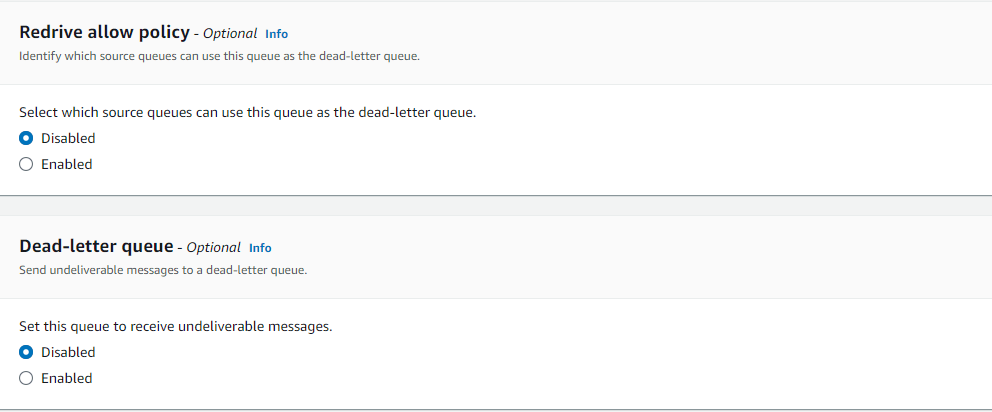
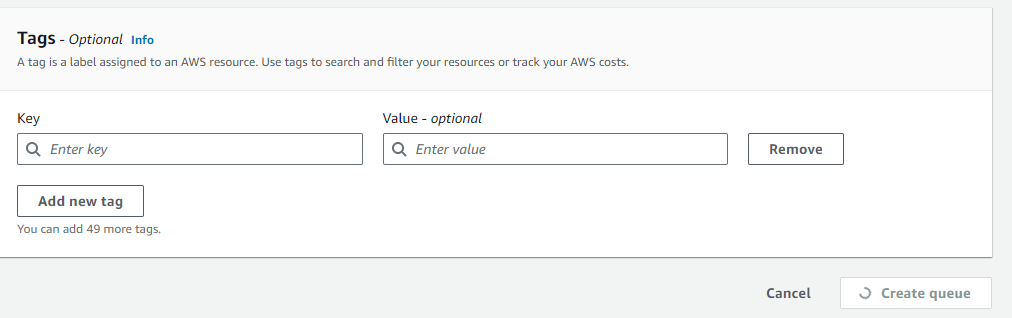
- Choose Create queue. Amazon SQS creates the queue and displays the queue’s Details page.


Dead-letter queues in Amazon SQS
Amazon SQS supports dead letter queues (DLQs), which can control source queues for messages that have not been successfully processed. DLQs are useful for debugging your application because you can isolate unused messages to determine why processing was unsuccessful.
Use a redrive policy to specify the maxReceiveCount. The maxReceiveCount is the number of times a consumer can receive a message from a source queue before it is moved to a dead-letter queue. Also, The redrive allow policy specifies which source queues can access the dead-letter queue.
Amazon SQS cost allocation tags
To organize and identify your Amazon SQS queues for cost allocation, you can add metadata tags that identify a queue’s purpose, owner, or environment. You can use cost allocation tags to organize your AWS bill to reflect your own cost structure.
Amazon SQS short and long polling
Amazon SQS has two polling options ie. short and long polling. In short polling, The ReceiveMessage request queries a subset of servers based on weighted logic and for long polling it queries all the servers.
Amazon SQS visibility timeout
When someone gets a message from an Amazon SQS queue, the message stays in the queue but others can’t see it for a short time. This is because of the visibility timeout, which stops others from handling the message while it’s being worked on. The timeout starts when a message is given to someone. They should work on and remove the message during this time. If they don’t remove the message before the timeout ends, it shows up in the queue again and someone else can get it.
Amazon SQS delay queues
Delay queues hold messages for a set time before they can be seen by consumers. This is useful if the consumer needs more time to handle messages. When you send messages to a delay queue, they are hidden for the delay time. The shortest delay is 0 seconds, and the longest is 15 minutes.
Creating ABAC policy to control access to Amazon SQS
{
  "Version": "2012-10-17",
  "Statement": [
    {
      "Sid": "AllowAccessForSameResTag",
      "Effect": "Allow",
      "Action": [
        "sqs:SendMessage",
        "sqs:ReceiveMessage",
        "sqs:DeleteMessage"
      ],
      "Resource": "*",
      "Condition": {
        "StringEquals": {
          "aws:ResourceTag/environment": "${aws:PrincipalTag/environment}"
        }
      }
    },
    {
      "Sid": "AllowAccessForSameReqTag",
      "Effect": "Allow",
      "Action": [
        "sqs:CreateQueue",
        "sqs:DeleteQueue",
        "sqs:SetQueueAttributes",
        "sqs:tagqueue"
      ],
      "Resource": "*",
      "Condition": {
        "StringEquals": {
          "aws:RequestTag/environment": "${aws:PrincipalTag/environment}"
        }
      }
    },
    {
      "Sid": "DenyAccessForProd",
      "Effect": "Deny",
      "Action": "sqs:*",
      "Resource": "*",
      "Condition": {
        "StringEquals": {
          "aws:ResourceTag/stage": "prod"
        }
      }
    }
  ]
}
Sending Large SQS Messages with Extended Client Library and AWS S3
The Amazon SQS Extended Client Libraries for Java and Python let you send big messages that are larger than the usual limit. These messages can be from 256 kilobytes (KB) to 2 gigabytes (GB) in size. Instead of sending the whole message directly, these libraries save the big message to an Amazon S3 bucket. Then, they send a reference or link to the message in the S3 bucket to the Amazon SQS queue. This way, you can work with much larger messages than usual by storing them in S3 and just sending a pointer to them in SQS.
The Extended Client Library for Python allows you to manage how payloads are handled with Amazon S3. You can configure the library to always store payloads in S3, or to do so only when the payload size is larger than 256 KB. Additionally, the library enables you to send messages that refer to a payload stored in an S3 bucket. You can also fetch the payload from S3 when needed, and delete it from the bucket when it’s no longer required
Below are following message attributes to configure the Amazon S3 message storage options:
large_payload_support: The Amazon S3 bucket name to store large messages.always_through_s3: IfTrue, then all messages are stored in Amazon S3. IfFalse, messages smaller than 256 KB will not be serialized to the s3 bucket. The default isFalse.
Managing large Amazon SQS messages with Extended Client Library for Python
The following example creates an Amazon S3 bucket with a random name. It then creates an Amazon SQS queue named MyQueue and sends a message that is stored in an S3 bucket and is more than 256 KB to the queue. Finally, the code retrieves the message, returns information about it, and then deletes the message, the queue, and the bucket.
import boto3
import sqs_extended_client

#Set the Amazon SQS extended client configuration with large payload.
sqs_extended_client = boto3.client("sqs", region_name="us-east-1")
sqs_extended_client.large_payload_support = "S3_BUCKET_NAME"
sqs_extended_client.use_legacy_attribute = False


# Create an SQS message queue for this example. Then, extract the queue URL.
queue = sqs_extended_client.create_queue(
    QueueName = "MyQueue"
)
queue_url = sqs_extended_client.get_queue_url(
    QueueName = "MyQueue"
)['QueueUrl']


# Create the S3 bucket and allow message objects to be stored in the bucket.
sqs_extended_client.s3_client.create_bucket(Bucket=sqs_extended_client.large_payload_support)

# Sending a large message
small_message = "s"
large_message = small_message * 300000 # Shall cross the limit of 256 KB

send_message_response = sqs_extended_client.send_message(
    QueueUrl=queue_url,
    MessageBody=large_message
)
assert send_message_response['ResponseMetadata']['HTTPStatusCode'] == 200

# Receiving the large message
receive_message_response = sqs_extended_client.receive_message(
    QueueUrl=queue_url,
    MessageAttributeNames=['All']
)
assert receive_message_response['Messages'][0]['Body'] == large_message
receipt_handle = receive_message_response['Messages'][0]['ReceiptHandle']

# Deleting the large message
# Set to True for deleting the payload from S3
sqs_extended_client.delete_payload_from_s3 = True
delete_message_response = sqs_extended_client.delete_message(
    QueueUrl=queue_url,
    ReceiptHandle=receipt_handle
)

assert delete_message_response['ResponseMetadata']['HTTPStatusCode'] == 200

# Deleting the queue
delete_queue_response = sqs_extended_client.delete_queue(
    QueueUrl=queue_url
)

assert delete_queue_response['ResponseMetadata']['HTTPStatusCode'] == 200
Amazon SQS batch actions
Amazon SQS provides batch actions to help you reduce costs and manipulate up to 10 messages with a single action. The Amazon SQS console does not support batch actions. You must use the query API or an AWS SDK to perform batch operations. These batch actions include:
Sending a message to an Amazon SQS queue from Amazon Virtual Private Cloud
In this tutorial, you learn on high level how to send messages to an Amazon SQS queue over a secure, private network. This network consists of a VPC that contains an Amazon EC2 instance. The instance connects to Amazon SQS through an interface VPC endpoint, allowing you to connect to the Amazon EC2 instance and send messages to the Amazon SQS queue even though the network is disconnected from the public internet.
- Create an Amazon EC2 key pair
- Create AWS resources
- Confirm that your EC2 instance isn’t publicly accessible
- Create an Amazon VPC endpoint for Amazon SQS
- Send a message to your Amazon SQS queue

Amazon VPC endpoint policy for Amazon SQS
The following example VPC endpoint policy specifies that the user MyUser is allowed to send messages to the Amazon SQS queue MyQueue.
{
   "Statement": [{
      "Action": ["sqs:SendMessage"],
      "Effect": "Allow",
      "Resource": "arn:aws:sqs:us-east-2:123456789012:MyQueue",
      "Principal": {
        "AWS": "arn:aws:iam:123456789012:user/MyUser"
      }
   }]
}
Encryption at rest in Amazon SQS
SSE protects the contents of messages in queues using SQS-managed encryption keys (SSE-SQS) or keys managed in the AWS Key Management Service (SSE-KMS). SSE encrypts the body of a message in an Amazon SQS queue.
SSE doesn’t encrypt the following:
- Per-queue metrics
- Queue metadata (queue name and attributes)
- Message metadata (message ID, timestamp, and attributes)
When you use Amazon SQS with AWS KMS, the data keys that encrypt your message data are also encrypted and stored with the data they protect. Data keys are symmetric keys you can use to encrypt data, including large amounts of data and other data encryption keys. Unlike symmetric KMS keys, which can’t be downloaded, data keys are returned to you for use outside of AWS KMS
The security of your encrypted data depends in part on protecting the data key that can decrypt it. Amazon SQS uses the KMS key to encrypt the data key and then the encrypted data key is stored with the encrypted message. This practice of using a KMS key to encrypt data keys is known as envelope encryption.
Configure AWS KMS permissions for producers
{
   "Version": "2012-10-17",
      "Statement": [{
         "Effect": "Allow",
         "Action": [
            "kms:GenerateDataKey"
         ],
         "Resource":  "arn:aws:kms:us-east-2:123456789012:key/1234abcd-12ab-34cd-56ef-1234567890ab"
         }, {
         "Effect": "Allow",
         "Action": [
            "sqs:SendMessage"
         ],
         "Resource": "arn:aws:sqs:*:123456789012:MyQueue"
      }]
}
Configure AWS KMS permissions for consumers
{
   "Version": "2012-10-17",
      "Statement": [{
         "Effect": "Allow",
         "Action": [
            "kms:Decrypt"
         ],
         "Resource": "arn:aws:kms:us-east-2:123456789012:key/1234abcd-12ab-34cd-56ef-1234567890ab"
         }, {
         "Effect": "Allow",
         "Action": [
            "sqs:ReceiveMessage"
         ],
         "Resource": "arn:aws:sqs:*:123456789012:MyQueue"
      }]
}
AmazonSQSFullAccess Managed Policy
Provides full access to Amazon SQS via the AWS Management Console.
{
  "Version" : "2012-10-17",
  "Statement" : [
    {
      "Action" : [
        "sqs:*"
      ],
      "Effect" : "Allow",
      "Resource" : "*"
    }
  ]
}
AmazonSQSReadOnlyAccess
Provides read only access to Amazon SQS via the AWS Management Console.
{
  "Version" : "2012-10-17",
  "Statement" : [
    {
      "Sid" : "AmazonSQSReadOnlyAccess",
      "Effect" : "Allow",
      "Action" : [
        "sqs:GetQueueAttributes",
        "sqs:GetQueueUrl",
        "sqs:ListDeadLetterSourceQueues",
        "sqs:ListQueues",
        "sqs:ListMessageMoveTasks",
        "sqs:ListQueueTags"
      ],
      "Resource" : "*"
    }
  ]
}
 Automate Infra