

If you are looking to transfer data between Software as a service (SaaS) applications and AWS services then you are at the right place to understand what is AWS Appflow.
Table of Content
- What is AWS Appflow?
- How does AWS Appflow work?
- What are AWS Appflow connectors?
- Cataloging the data output from an Amazon AppFlow flow
- Allowing IAM users to access Amazon Appflow
- Monitoring CloudWatch Logs for AWS Appflow
- How to Create AppFlow Flow?
- Conclusion
What is AWS Appflow?
AWS Appflow allows to transfer data between Software as a service (SaaS) applications such as salesforce and AWS services such as AWS S3 or AWS Redshift.

How does AWS Appflow work?
In below section lets assume you want to transfer data from SAAS based Salesforce to AWS S3, so you will need to perform as follows:
- Make sure you have AWS S3 Bucket.
- Salesforce already setup.
- Next create a flow. While creating the flow, make sure to configure flow with these details:
- Encrypt the data
- Add tags to your flow.
- Source name
- Connection name.
- bucket details.
- Also define the flow trigger. A trigger determines how a flow runs. The following are the supported flow trigger types:
- Run on demand — Users manually run the flow as needed.
- Run on event — Amazon AppFlow runs the flow in response to an event from an SaaS application.
- Run on schedule — Amazon AppFlow runs the flow on a recurring schedule.
- Map data fields.
Now, you are good to activate the flow.

What are AWS Appflow connectors ?
While creating connection between any SAAS application and AWS service you need to select the connector such as for salesforce the connector is salesforce.

Cataloging the data output from an Amazon AppFlow flow
When Appflow transfers data using flow, you can also register the data with data catalog. The data catalog is metadata repository which represents data into schemas, format and data types. The benefit of data catalog is that even if your data belongs to multiple datasets you can easily query the data.
When the flows run, Amazon AppFlow creates metadata tables in the AWS Glue Data Catalog.
Allowing IAM users to access Amazon Appflow
This policy example provides full access to Amazon AppFlow, to all AWS services that are available as flow sources or destinations, and to AWS Key Management Service (AWS KMS).
{
    "Version": "2012-10-17",
    "Statement": [
        {
            "Effect": "Allow",
            "Action": "appflow:*",
            "Resource": "*"
        },
        {
            "Sid": "ListRolesForRedshift",
            "Effect": "Allow",
            "Action": "iam:ListRoles",
            "Resource": "*"
        },
        {
            "Sid": "KMSListAccess",
            "Action": [
                "kms:ListKeys",
                "kms:DescribeKey",
                "kms:ListAliases",
               "kms:CreateGrant",
               "kms:ListGrants"
            ],
            "Effect": "Allow",
            "Resource": "*"
        },
        {
            "Sid": "S3ReadAccess",
            "Effect": "Allow",
            "Action": [
                "s3:ListAllMyBuckets",
                "s3:ListBucket",
                "s3:GetBucketLocation",
                "s3:GetBucketPolicy",
                "s3:PutBucketPolicy"
            ],
            "Resource": "*"
        },
        {
            "Sid": "SecretsManagerCreateSecretAccess",
            "Effect": "Allow",
            "Action": ["secretsmanager:CreateSecret",  "secretsmanager:PutResourcePolicy"]
            "Resource": "*",
        },
    ]
}
Monitoring Cloud watch Logs for AWS Appflow
Amazon Appflow service reports the following metrics in the AWS/AppFlow namespace. Below are name and description of metrics that are reported.
- FlowExecutionsStarted: The number of flow runs started.
- FlowExecutionsFailed: The number of failed flow runs.
- FlowExecutionsSucceeded: The number of successful flow runs.
- FlowExecutionTime: The interval, in milliseconds, between the time the flow starts and the time it finishes.
How to Create AppFlow Flow ?
In order to create a flow in AWS Appflow, perform the following steps.
- Navigate to AWS Appflow service and click on Create flow.

- Next, add all the parameters that are required for Appflow.

- Next configure the Appflow with source, destination and trigger details.
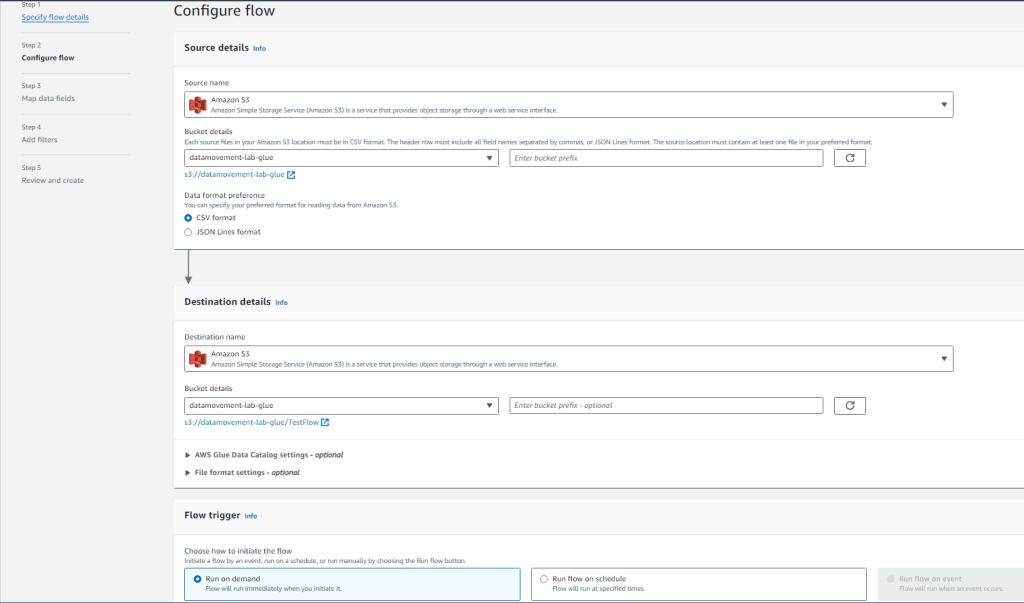
- Further add the Map data fields.

- Continue to click on next and you will be able to create a Test Flow Appflow.
Conclusion
In this we learned how you can transfer data between Software as a service (SaaS) applications and AWS services using AWS Appflow.
 Automate Infra